

 Back to blog
GitHub: How to Manage Code and Collaboration in ML

 CEO of Label Your Data


Table of Contents

- TL;DR
- What Is GitHub? Developer Platform Overview
- What Is Git?
- Git vs GitHub: What’s the Difference?
- How Does GitHub Work? 7 Terms That Explain Everything
- How to Use GitHub for ML Projects
- Tracking Code and Dataset Versions With GitHub
- Using GitHub Actions to Check ML Changes
- GitHub Alternatives
- Bring Code and Annotation Changes Together in GitHub
- About Label Your Data
- FAQ
TL;DR
- GitHub hosts Git repositories and gives ML teams a shared place to review code, track issues, and automate development tasks.
- A useful ML pull request connects code to model behavior, with tests and evaluation results that explain the effect of the proposed change.
- Every training run needs a traceable record linking its code version to the dataset, labeling rules, data splits, training setup, and results.
- GitHub Actions and Copilot support development, but passing automated checks or generating working code doesn’t establish model quality.
- Annotation changes deserve review alongside code changes, because a revised labeling rule can change what the model learns and how its performance should be evaluated.
A teammate shares a GitHub link and asks for your thoughts on a change to the training pipeline. The code looks reasonable, and the model’s score has improved. But what produced that improvement: the code, the data, or a change in how performance was measured?
GitHub gives your team a shared place to investigate those questions. Understanding repositories and pull requests is the first step; making them useful for machine learning work takes more context.
This guide is for ML engineers, data scientists, and technical leads getting familiar with GitHub or improving an existing workflow. It covers the essentials of repositories and pull requests, explains how to track dataset versions, automate useful checks, and keep AI training data decisions connected to model results.
If “it’s on GitHub” or “open a pull request” is part of your team’s daily conversation, this guide will help you understand the workflow or improve how you use it for ML projects.
What Is GitHub? Developer Platform Overview
GitHub is a software development platform that hosts Git repositories and helps teams review changes, track work, and automate development tasks.
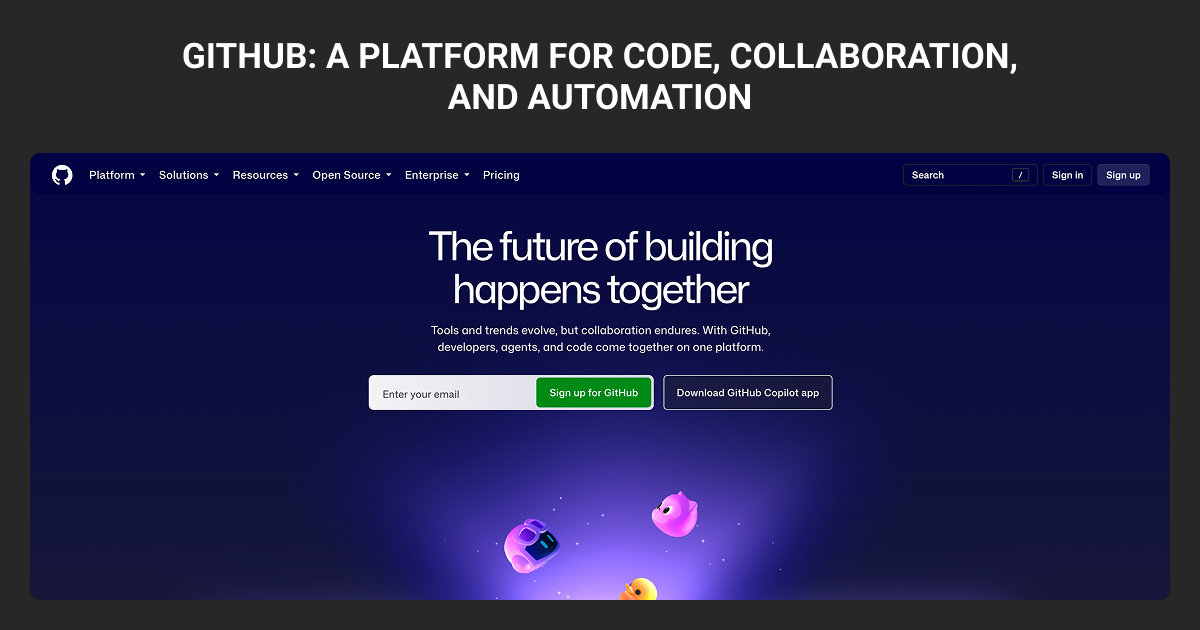
GitHub has become the default home for the world’s software. GitHub’s Octoverse 2025 report recorded more than 180 million developers and 630 million projects, from weekend hobby apps to the code behind major companies and open source tools you use every day.
For an ML project, a GitHub repository, or repo, typically contains training code, configuration files, tests, and documentation.
A public repository is visible to anyone, while a private one restricts access. However, public visibility doesn’t automatically grant permission to reuse the contents. You need to check the license before incorporating someone else’s implementation into your product.
| What it is | An online platform for hosting and collaborating on code projects that use Git |
| Owned by | Microsoft (acquired in 2018 for $7.5 billion) |
| Launched | April 2008, by Tom Preston-Werner, Chris Wanstrath, PJ Hyett, and Scott Chacon |
| Users | 180+ million developers (GitHub Octoverse 2025) |
| Projects hosted | 630+ million repositories (Octoverse 2025) |
| Price | Free for individuals and teams; paid plans from $4 per user per month |
| Known for | Open source, pull requests, GitHub Actions, GitHub Copilot |
The problem GitHub helps teams solve is keeping track of changes when several people work on the same project. Most of us have seen a folder like this:
proposal.docxproposal_v2.docxproposal_final.docxproposal_FINAL_use_this_one.docx
Now imagine that problem with thousands of files and dozens of people editing them at the same time. Someone overwrites someone else's work. Nobody knows which version is current. A change breaks something, and no one can tell what changed or how to undo it.
Software teams solved this with version control: a system that keeps a complete, organized history of every change to a project. GitHub is where most of that version-controlled work now lives.
To understand GitHub, though, you first need to meet the tool underneath it: Git.
What Is Git?
Git is free, open source version control software that tracks changes to files. Linus Torvalds, the creator of Linux, built it in 2005, and it’s now the most widely used version control system in the world.
Git runs on your own computer. Every time you reach a meaningful point in your work, you tell Git to save a snapshot of the project. Over time, those snapshots form a complete history, so you can:
- See what changed, when, and who changed it
- Rewind to any earlier version if something breaks
- Try new ideas in a separate copy without touching the working version
- Combine work from several people into one project
Think of Git as an unlimited, extremely detailed “undo” history for an entire project, plus the ability to work on several versions in parallel.
What Git doesn’t do on its own is give your team a shared, online place to keep the project, discuss changes, and review each other’s work. That’s the gap GitHub fills.
Git vs GitHub: What’s the Difference?
Git is the tool. GitHub is the place.
Git tracks changes to a project on your computer. GitHub stores Git projects online and adds everything a team needs around them: a website to browse the code, discussions, reviews, permissions, task tracking, and automation.
An analogy: if Git is the “track changes” feature in a document, GitHub is the shared workspace where everyone’s tracked changes come together, get discussed, and get approved.
This is the single most common point of confusion between Git vs GitHub, so here it is plainly:
| Git | GitHub | |
| What it is | Version control software | Online platform for hosting Git projects |
| Where it runs | Your computer | The web (plus desktop and mobile apps) |
| How you use it | Mostly command line | Website, desktop app, command line, API |
| Main job | Track changes and history | Collaboration, review, sharing, automation |
| Needs internet? | No | Yes |
| Cost | Free and open source | Free plan plus paid plans |
| Who's behind it | Open source community | Microsoft |
You can use Git without GitHub, and some teams host their Git projects on alternatives like GitLab or Bitbucket. But you can’t really use GitHub without Git, because Git is the engine running underneath every GitHub project.
How Does GitHub Work? 7 Terms That Explain Everything
GitHub has its own vocabulary, from reviewing a teammate’s changes to tracking your own experiments. These seven terms explain how the workflow fits together.
1. Repository (repo)
A repository is a project’s home on GitHub: a folder that holds all the project’s files plus the recorded history of committed changes. Most repositories include a README file, which works like a front page explaining what the project is and how to use it.
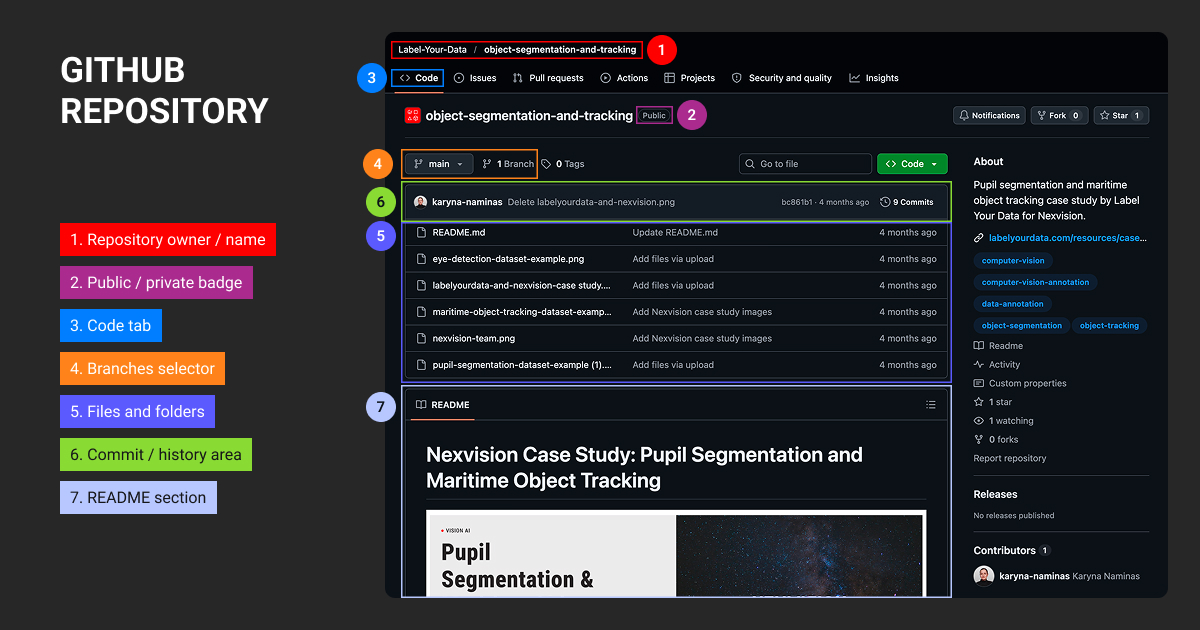
Repositories can be public (anyone on the internet can see them) or private (only people you invite can see them).
2. Commit
A commit is a saved snapshot of changes, with a short message describing what changed and why. Like “Fix typo on pricing page” or “Add search to the help center.” A project’s history is simply a long chain of commits, each with a name, timestamp, and author attached.
3. Branch
A branch is a parallel version of the project where you can work without affecting anyone else. The main, official version usually lives on a branch called main. When you want to add a feature or fix a bug, you create a new branch, do your work there, and leave main untouched until your changes are ready.
4. Pull request (PR)
A pull request is a request to merge the changes from your branch into another branch, usually main. It’s the heart of collaboration on GitHub.
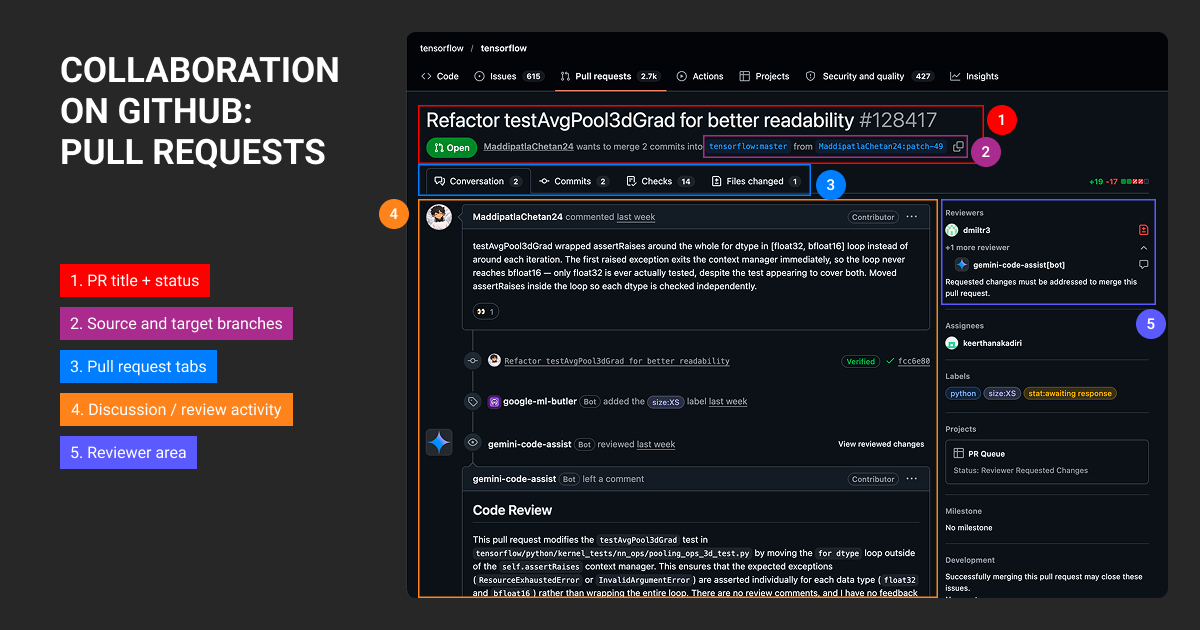
A pull request shows exactly what changed, line by line: additions in green, removals in red. Teammates can comment on specific lines, ask questions, suggest edits, and finally approve. Automated checks can run too, such as tests that confirm nothing broke.
According to GitHub’s Octoverse 2025 report, users merged an average of 43.2 million pull requests every month.
5. Merge
Merging combines the approved changes from one branch into another. Once a pull request is merged, your work officially becomes part of the main project.
6. Fork and clone
- A fork is your own copy of someone else’s repository, saved to your GitHub account. Forking is how people contribute to projects they don’t own: copy it, improve it, then propose the changes back with a pull request.
- A clone is a copy of a repository downloaded to your computer, so you can work on it locally.
7. Push and pull
- Push uploads the commits you made on your computer to GitHub.
- Pull fetches changes from a remote repository and integrates them into your current branch.
Pushing sends your local commits to a remote repository, such as one hosted on GitHub, where teammates can access and review them.
Here’s how a typical change travels through GitHub, called the GitHub flow:
- Create a branch from
mainfor your change. - Make your edits and commit them with clear messages.
- Push your branch to GitHub.
- Open a pull request explaining what you changed and why.
- Review and discuss. Teammates comment, automated tests run, and you make any fixes.
- Merge into
mainonce it’s approved, then delete the branch.
As a result, your team has a record of committed changes and review discussions, and always knows what changed and why, and can undo it if needed.
How to Use GitHub for ML Projects
ML teams use GitHub to manage training code, review experiments, and coordinate development.
Issues track problems such as a failing data loader, while pull requests give teammates a place to discuss a proposed fix. GitHub Actions runs the automated checks the team has configured.
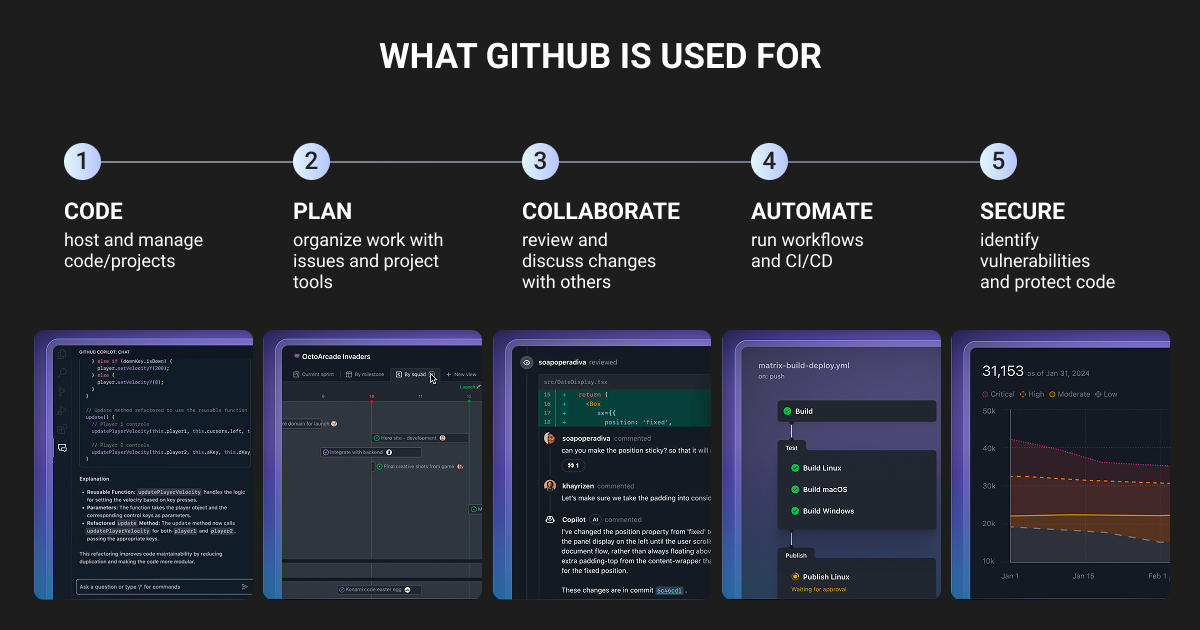
These activities follow a shared workflow: create a branch, commit your changes, push them to GitHub, and open a pull request for review before merging. For ML projects, that review needs to connect the code with the data and evaluation results behind it.
Here’s how to set up the repository and make each change easier to assess.
Create a GitHub repository
In GitHub, select New repository, choose a name and visibility, and initialize it with a README. For an existing company project, follow the organization’s repository and access policies.
The README should answer the questions a teammate needs resolved before running anything: what the project predicts, how to install its dependencies, and which command runs the tests. Explain where authorized users obtain the data and how to identify the expected dataset release.
Document the chosen machine learning algorithm and the configuration that controls its behavior. Avoid leaving essential settings in an undocumented notebook cell.
Notebooks are useful for exploration. Move preprocessing and evaluation logic used by multiple people into importable modules with tests. That makes behavior easier to review without reconstructing someone’s interactive session.
Download, clone, or fork the project
Download ZIP provides a snapshot of repository files without Git history. In the repository’s Code menu, select Download ZIP after choosing the intended branch or tag.
Cloning creates a local Git repository for development. Copy its URL from the same menu and use Git or GitHub Desktop to clone it. A fork creates a related repository on GitHub, commonly used when contributing without write access to the original project.
For your ongoing team development, cloning is usually the appropriate choice. Once you’ve downloaded the files, you’ll still need to install the dependencies and obtain the dataset. Follow the repository’s setup instructions for those steps.
Make the pull request explain the experiment
Consider an image recognition model that classifies products as damaged or undamaged. The team discovers that center cropping cuts off defects near image edges. An engineer proposes resizing the full image and adding padding to fit the model’s input dimensions.
Create a branch for the fix and add a test that reproduces the problem. For example, use a small synthetic image with a marked corner and check that the updated preprocessing preserves it. This becomes a regression test: it should catch a future change that reintroduces the same error.
The pull request should explain why the change is needed and link to its evaluation results. Keep the dataset and evaluation procedure fixed when comparing the old and new approaches. If several things change at once, reviewers won’t know which change explains the result.
Look beyond overall accuracy: does your model catch more edge defects without flagging more undamaged products? Report both results and your sample size so reviewers can assess the evidence.
Require the right review
Assign review responsibilities according to the change. Ask an engineer familiar with the image pipeline to review preprocessing updates, and involve your data annotation lead when class definitions change.
GitHub’s CODEOWNERS file maps paths to responsible people or teams and supports automatic review requests. Requiring their approval is a separate repository setting.
Set up branch protection to require review approvals and automated checks before merging, and check who can bypass those rules. For a private repository, confirm that your GitHub plan supports the protections you need.
In practice, code review also means questioning the modeling choices behind a change, as Derek Wild, CEO and founder of Listening, explains:

One thing we’ve learned is that GitHub becomes much more valuable in machine learning once you stop treating it as a place to store code. We encourage reviewers to challenge assumptions rather than syntax. Instead of asking, "Does this code run?" we ask, "Would we still make this modeling decision if the dataset doubled in size?" or "What kind of examples is this likely to fail on?

 CEO & Founder, Listening.com
Use GitHub Copilot to support development
GitHub Copilot is an AI coding assistant that works in supported code editors and on GitHub. It suggests code, answers questions about your codebase, and helps with reviews. For ML projects, you might use it to draft a dataset validator or suggest preprocessing tests.
Check the generated code against your project’s requirements before using it. It might run successfully but assign the wrong class IDs or introduce data leakage. Review the generated tests too, since they may repeat the same mistakes as the code they’re supposed to test.
Tracking Code and Dataset Versions With GitHub
Record which code and dataset versions produced each model result so your team can trace unexpected changes in performance. GitHub tracks your committed code, but it doesn’t automatically identify the data used in a training run. You’ll need to link that commit to the dataset release and training settings.
Suppose a teammate reruns the same script after an annotation export has been replaced. The code hasn’t changed, but the training data has. A path such as data/latest won’t explain the difference.
Give each release of your machine learning datasets a unique identifier and keep its contents unchanged. Include a manifest that lists the samples in that release, along with checksums to help you detect changes to individual files.
For each training run, record:
| Record | What it needs to identify |
| Code | The exact commit, plus any uncommitted changes used in the run |
| Dataset | The dataset release and its list of samples |
| Labeling rules | The label format and annotation guideline version |
| Data split | Which samples belong to training, validation, and testing |
| Training setup | Model settings, random seeds, software versions, and relevant hardware details |
| Results | The saved model, evaluation report, and run identifier |
Save these details in your experiment tracker and link the run in your pull request so teammates can find the files behind the result. To reproduce it exactly, you may also need to match the hardware and control operations that vary between runs.
Decide where to store datasets and model checkpoints
Keep your code and non-sensitive dataset manifests in GitHub. For large image collections and model checkpoints, use storage that gives your team the access controls and capacity they need. Add retrieval instructions to the repository so authorized teammates know where to find the exact versions used in a run.
If you need to version large files alongside your code, consider Git Large File Storage (Git LFS). It keeps small pointer files in Git and stores the actual contents separately. You’ll still need to record the dataset’s labeling rules and train, validation, and test splits.
Before committing, use .gitignore to exclude local datasets, credentials, and temporary outputs. It only applies to untracked files, so check what Git already tracks.
Review notebook outputs as well: they can expose private samples or credentials even when the code itself is safe to share. For example, John Ozuysal, founder of House of Growth, describes how his team used GitHub records to explain differences in model performance:
GitHub was a huge help for our machine learning work. On a thumbnail classifier project, we tracked every single attempt with issues and markdown files. So when someone asked why one version performed better, we just pulled up the record.

Using GitHub Actions to Check ML Changes
GitHub Actions lets you run automated checks when a pull request opens or changes. You define the test commands in YAML files under .github/workflows, and runners provide the machines that execute them.
For your ML repository, focus first on fast checks that catch problems before you spend time and compute on training.
| Check | What to verify | Problem it helps catch |
| Label schema | Required fields, allowed class IDs, and the expected class mapping | An annotation export no longer matches your training code |
| Preprocessing | Output shape, data type, channel order, and behavior on test images | A crop removes the defect your model needs to detect |
| Split integrity | Samples and related groups don’t overlap across splits where independence is required | Images of the same product appear in both training and validation |
| Inference smoke test | A specific checkpoint version loads and processes sample inputs | A dependency or interface change breaks prediction |
Passing these checks gives you evidence about specific behaviors. A smoke test shows that your model loads and processes the sample inputs; it doesn’t tell you how well it performs across the evaluation dataset. Similarly, valid label formatting doesn’t mean the annotations are correct.
For full training runs, you’ll also need to arrange compute and dataset access. Actions can coordinate the workflow, but you still have to provide a suitable execution environment, including GPUs if the job requires them.
Check for data leakage
Data leakage lets information influence training or model selection when it should remain outside that process. Your evaluation scores may improve without a corresponding improvement on new data.
For your product classifier, different image IDs aren’t enough: several photos may show the same physical product. To assess performance on unseen products, keep all views of each product in one split. Scikit-learn’s group-aware splitters can be helpful in this case. If your goal is deployment at a new factory, consider holding out an entire site.
Preprocessing needs the same care. Calculate normalization statistics from training data only, then apply those values to validation and test data. A scikit-learn Pipeline helps keep learned preprocessing within each training fold during cross-validation.
Use your validation results to guide development and reserve the test set for final assessment. Repeatedly adjusting your model based on test scores undermines that independent check.
GitHub Alternatives
GitHub is the market leader, but it isn’t the only option for ML teams and developers. All of these use Git underneath, so everything in this guide carries over:
- GitLab: An all-in-one DevOps platform, popular with teams that want to host it on their own servers.
- Bitbucket: Atlassian’s option, a natural fit for teams already using Jira and Confluence.
- Azure DevOps: Microsoft’s enterprise development suite, common in large organizations.
- Self-hosted Git (Gitea, Forgejo): For teams that want full control of their infrastructure.
Bring Code and Annotation Changes Together in GitHub
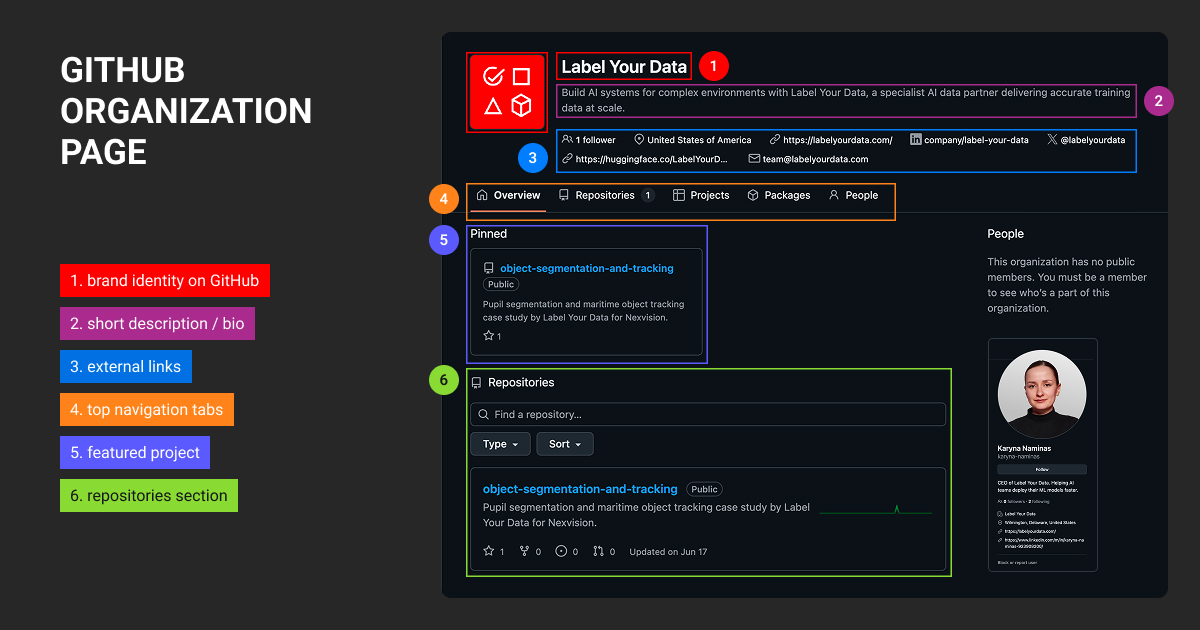
Changes to labeling rules affect what your model learns, even when the code stays the same. Use GitHub to review those changes and connect them to the dataset releases they affect.
For your damaged-product classifier, suppose “damaged” now includes torn packaging. Update the annotation guidelines through a pull request, explain the decision, and ask your labeling lead to review it. Record whether existing labels need correction and identify the first dataset release that follows the new rule.
Keep the guidelines and label schema in the repository when access policies permit; the annotations themselves can remain in your annotation platform or controlled storage. This gives your team a history of data annotation decisions to consult when investigating model results.
Over time, that documentation helps teams revisit earlier decisions, too. As Damien Mourot, co-founder of AGO, recalls:
Our team once had this long back-and-forth about how to preprocess some data, so we logged the whole reasoning in GitHub Discussions. Six months later, when someone asked "Why did we do that again?" the answer was right there.
 CTO, AGO
GitHub is where most of the world’s software gets built. It takes Git’s powerful change tracking and turns it into teamwork: repositories hold the work, branches keep experiments safe, pull requests make every change reviewable, and automation and AI tools handle the rest.
For your ML team, that shared history is most useful when it connects code changes to the data behind each result. As your datasets grow, a reliable data annotation partner like Label Your Data that work through data annotation services that help apply labeling rules consistently and review ambiguous cases, giving your team better data to build on.
About Label Your Data
Label Your Data is a specialist AI data partner for teams building AI systems in complex environments. We combine tool-agnostic workflows with custom QA and offer a no-cost pilot to validate annotation requirements before production.
 Data Annotation for Complex Environments
Rely on consistent, high-quality output for complex datasets, detailed taxonomies, and edge cases.
 Structured Quality From Pilot to Production
Get quality engineered into every step through onboarding, evolving guidelines, QA, and continuous feedback.
 Flexible and Scalable Operations
Adjust team capacity, project size, and delivery model as you scale, with no setup fees or long-term lock-ins.
 An Integrated Delivery Partner
Align on goals, workflows, and expectations with a team that integrates into your process from day one.
 Projects Led by Annotation Experts
Work with former annotators who understand annotation complexity, quality standards, and high-volume delivery.
FAQ
What exactly is GitHub used for?
GitHub hosts Git repositories and supports code review, issue tracking, and development automation. ML teams use it to manage changes to training and inference code, with references to the datasets and evaluation results associated with those changes.
Who owns GitHub?
Microsoft owns GitHub. It completed the acquisition in October 2018.
Is GitHub free or paid?
GitHub offers both free and paid plans. GitHub Free includes unlimited public and private repositories; paid plans add capabilities and allowances. Review the current GitHub pricing against your requirements for private-repository controls, automation, and storage.
Do I need GitHub?
You don’t need GitHub specifically to develop ML systems. Git works independently, and other platforms host Git repositories. GitHub is useful when your team needs a shared environment for reviewing code, tracking decisions, and coordinating automated checks.
Is GitHub difficult to learn?
The basic repository, branch, commit, and pull request workflow is approachable. GitHub’s Hello World exercise introduces it in a browser. Team permissions, automation, and ML experiment traceability require additional setup and agreed working practices.
What is the GitHub Copilot used for?
GitHub Copilot helps developers write and explain code, investigate problems, and review proposed changes. In ML work, it assists with implementation tasks; engineers remain responsible for checking data assumptions, evaluation logic, and generated code.
Is GitHub Copilot now free?
GitHub offers Copilot Free with limited access to selected features, alongside paid plans. Eligibility and allowances differ, so consult the current Copilot plan comparison before choosing it for individual or team use.
Written by
CEO of Label Your Data
Karyna is the CEO of Label Your Data, a company specializing in data labeling solutions for machine learning projects. With a strong background in machine learning, she frequently collaborates with editors to share her expertise through articles, whitepapers, and presentations.