

 Back to blog
8 CVAT Alternatives for Image, Video, and 3D Annotation

 CEO of Label Your Data


Table of Contents

- TL;DR
- When to Consider CVAT Alternatives for Computer Vision
- Quick Overview of Top CVAT Alternatives for AI Projects
- Label Your Data
- Label Studio
- Roboflow
- Labelbox
- V7 Darwin
- Encord
- SuperAnnotate
- Supervisely
- Other CVAT Alternatives to Consider
- How to Choose the Right Computer Vision Annotation Tool
- About Label Your Data
- FAQ

TL;DR
- Shortlist CVAT alternatives around your hardest annotation task: image labeling, video tracking, and synchronized camera–LiDAR annotation require different capabilities.
- Compare the effort needed to deliver reviewed labels, including corrections to AI-generated annotations, reviewer coordination, and infrastructure maintenance, because a longer feature list doesn’t guarantee faster dataset delivery.
- If staffing and QA are delaying your next training run, managed annotation may address the problem without a migration: Label Your Data can work within your existing CVAT setup.
If your next training run is waiting on reviewed annotations, you need to know what’s holding up delivery. Your team might be spending hours correcting object tracks, resolving inconsistent labels, or maintaining a self-hosted annotation setup. Each problem calls for a different solution.
This guide compares eight CVAT alternatives by their support for image, video, and 3D annotation, with attention to automation, QA, deployment, and staffing. You’ll see where each option fits and which trade-offs to check before migrating.
We also explain when managed annotation makes sense. For teams that need help delivering labeled datasets, that can include keeping the CVAT (computer vision annotation tool) and bringing in a dedicated annotation team.
When to Consider CVAT Alternatives for Computer Vision
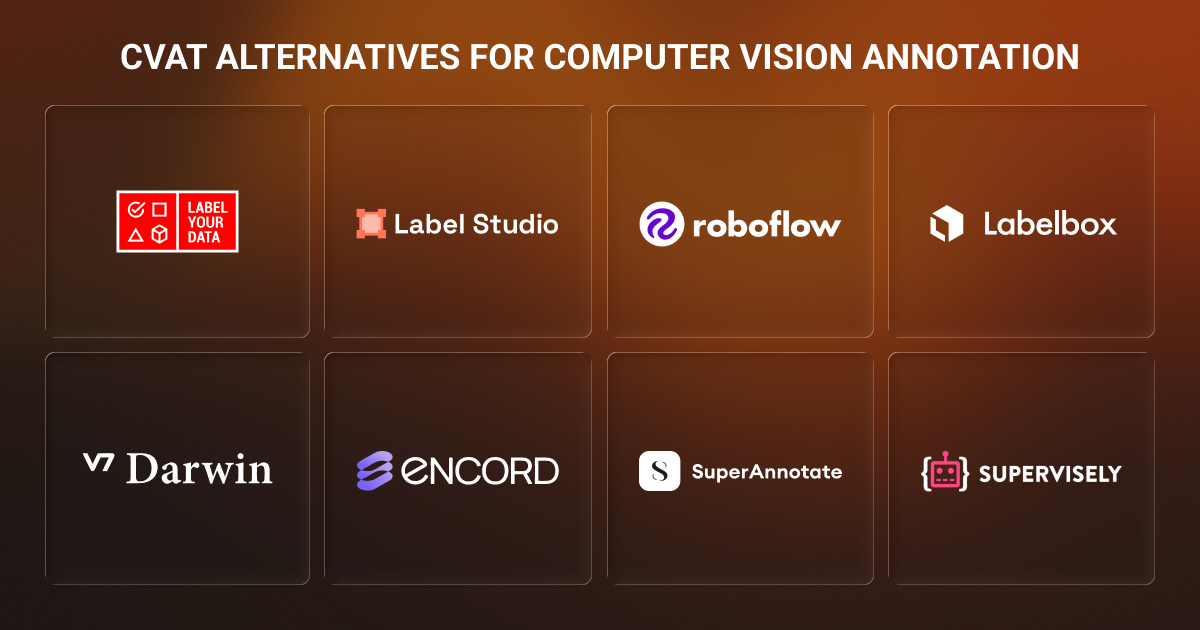
Consider CVAT alternatives when your current setup adds work that delays dataset delivery or makes annotation quality harder to maintain. Before switching, check whether a different CVAT plan, deployment, or workflow would address the problem.
Common reasons to evaluate CVAT alternatives include:
- Infrastructure maintenance takes too much engineering time. With self-hosted CVAT, your team handles upgrades, storage, and deployment. If maintaining growing computer vision datasets competes with model development, compare hosted options and their operating costs.
- Review requires too much coordination outside the tool. CVAT includes review and consensus features, with availability depending on the edition and plan. Test whether your setup supports the approval stages, reviewer assignments, and reporting your project needs.
- Your data requires a more specialized workflow. Projects involving synchronized camera and LiDAR data or medical scans need more than a supported file extension. Test navigation, annotation, and export on representative samples.
- Your team cannot meet annotation volume or deadlines. Recruiting annotators, maintaining guidelines, and reviewing edge cases require ongoing capacity. A managed provider can take responsibility for those operations.
Decide whether you need different software, additional annotation capacity, or both. Outsourcing data annotation to a specialist AI data partner can let you keep CVAT while a dedicated team handles labeling and QA within your existing workflow.
Quick Overview of Top CVAT Alternatives for AI Projects
Use this quick CVAT alternatives comparison to shortlist data annotation tools and services around your model training requirements. Some of these software vendors also offer labeling teams, so check whether your quote covers platform access, managed annotation, or both.
Looking for popular alternatives to CVAT? Use this comparison to shortlist data annotation tools and services around your dataset and delivery needs. Check whether each offer covers platform access, managed annotation, or both.
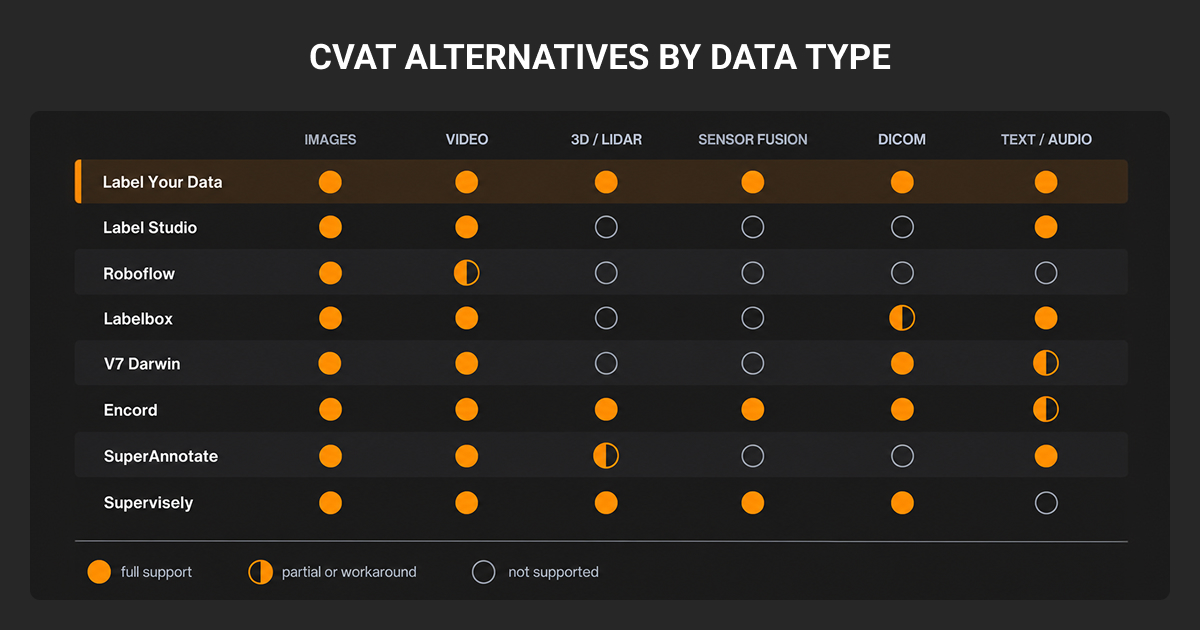
| CVAT alternative | Best for | Main data types | Offering | Managed workforce | AI-assisted labeling | Deployment |
| Label Your Data | Managed annotation within your existing workflow | Image, video, 3D/LiDAR/RADAR, text, audio | Managed service and self-serve platform | Dedicated team, human-led QA, and project management | Depends on the agreed tools and workflow | Your preferred platform or a provider-arranged setup. |
| Label Studio | Configurable multimodal labeling | Image, video, text, audio, time series | Open-source Community; paid editions | Optional services through HumanSignal | Model predictions and interactive assistance through integrations | Self-hosted or cloud, depending on edition. |
| Roboflow | Connecting image annotation to model development | Images and extracted video frames | Commercial platform; free tier | Optional labeling partners | Auto Label and interactive Label Assist | Cloud annotation; model deployment also supports your own hardware. |
| Labelbox | Enterprise data curation and labeling workflows | Image, video, text, audio, documents | Commercial platform and services | Optional labeling services | Foundation-model pre-labeling | Cloud platform. |
| V7 Darwin | AI-assisted visual and medical annotation | Image, video, DICOM | Commercial platform and services | Optional labeling services | Automated segmentation and video tracking | Cloud; confirm private deployment requirements with sales. |
| Encord | Video, sensor fusion, and physical AI | Image, video, LiDAR, medical and multimodal data | Commercial platform and services | Optional managed annotation | Model-assisted pre-labeling and tracking | Cloud; VPC and on-premises options for enterprise requirements. |
| SuperAnnotate | Annotation software with managed delivery | Image, video, LiDAR, text, audio | Commercial platform and services | Optional managed teams and project management | Model pre-labeling and automated review workflows | Cloud; specialized on-premises deployments available. |
| Supervisely | Annotation, training, and deployment in one platform | Image, video, 3D/LiDAR, DICOM | Commercial platform; free tier | Optional managed annotation | Interactive segmentation and model-assisted labeling | Cloud or self-hosted Enterprise. |
Before you shortlist best CVAT alternatives for image labeling, check what your plan includes and where the computer vision annotation software runs. A connection to your storage lets the platform access your data; it doesn’t mean you’re hosting the platform yourself.
Label Your Data
Best CVAT alternative for managed, scalable annotation workflows.
Label Your Data is a data annotation company for AI teams that need help delivering labeled datasets for complex computer vision projects. Dedicated annotation teams handle labeling, with QA specialists reviewing outputs and project managers coordinating delivery.
Its computer vision annotation services cover images, video, and complex 3D LiDAR/RADAR data, including segmentation, object tracking, and custom labeling requirements. Teams work to your taxonomy and annotation guidelines, with review workflows tailored to the errors and edge cases that improve your model performance.
If CVAT already fits your technical requirements, you can keep it. Label Your Data works within your preferred annotation environment, so outsourcing doesn’t require migrating to another vendor’s platform. You still defines the task and acceptance criteria, while our team manages day-to-day annotation operations.
A no-cost pilot lets you assess Label Your Data quality and the working process before committing to production volumes. Our transparent data annotation pricing supports hourly, per-object, per-task, or project-based arrangements, with no required long-term contract.
Label Studio
Best open-source multimodal CVAT alternative.
Label Studio is worth considering when your annotation tasks combine visual data with text, audio, or time series. Its configurable interfaces let you bring different inputs into one task, such as displaying an image alongside a description for annotators to assess.
You can adapt existing templates through XML configuration and connect a machine learning backend to generate pre-labels. That flexibility suits teams willing to build and maintain their own integrations.
The open-source Community edition supports self-hosting, but your team handles infrastructure and maintenance. Check the edition before planning production workflows: reviewer assignments and role-based access require a paid edition, while SSO, performance dashboards, and built-in active learning loops require Enterprise.
Compare those requirements before assuming an open source image annotation tool switch will reduce your operating costs.
Roboflow
Best for developer-friendly end-to-end computer vision workflows.
Roboflow suits teams that want annotation connected to dataset versioning, model training, and deployment. For an image recognition project, you can label images, create a dataset version with preprocessing and augmentation, then train and deploy a model within the same ecosystem. That broader workflow is its main reason to make your shortlist alongside CVAT.
Check whether its training options support your chosen machine learning algorithm or whether you’ll need to export the dataset and train elsewhere.
Auto Label generates annotations using foundation models, while Label Assist applies predictions from your own models. Annotators can review and correct those predictions in the editor, and optional labeling partners can handle outsourced work.
However, you should check the fit carefully for video annotation projects: Roboflow’s documented upload workflow extracts frames at a chosen sampling rate. That suits image-based training, but frame extraction alone doesn’t preserve object IDs across frames for object tracking annotations.
Also factor in dataset privacy: the free Public plan makes datasets public, while paid plans support private data.
Labelbox
Best alternative for dataset curation and multi-stage annotation review.
Labelbox suits teams that need to select data for labeling and coordinate reviews across multiple projects. Catalog lets you search machine learning datasets by metadata, annotation class, or visual similarity, then send selected samples into labeling projects. This makes it useful when deciding what to annotate is as demanding as the annotation itself.
Its configurable workflows route annotations through review and rework stages, with assignments for specialist reviewers. Foundry adds foundation-model pre-labeling, and teams can use their own annotators or request managed labeling services. These connected curation and review workflows are the main reason to evaluate it alongside CVAT.
Check costs against your actual dataset and planned usage. Labelbox meters platform activity through usage credits, with different calculations for images, video, and documents. Ask for an estimate covering the platform features, model usage, and labeling services you’ll need.
V7 Darwin
Best for AI-assisted segmentation and medical imaging annotation.
V7 Darwin is one of the best CVAT alternatives for image labeling worth considering when drawing detailed object boundaries takes up much of your annotation time. Auto-Annotate generates a polygon from a rough bounding box, which annotators can refine with corrective clicks. For video, interpolation fills in annotations between edited keyframes.
Medical imaging gives it a more specific reason to join your shortlist of image annotation tools. V7 supports DICOM and NIfTI files, with tools for editing segmentation masks across linked axial, sagittal, and coronal views. This lets reviewers inspect an anatomical structure from multiple directions.
For standard image and video projects, test how much correction time its automation saves compared with your CVAT setup. For medical datasets, check scan compatibility: V7’s documentation currently limits multi-planar annotation to axially acquired scans.
Encord
Best CVAT alternative for video and synchronized sensor annotation.
Encord is worth evaluating when your project combines video with LiDAR or other sensor streams. Its sensor-fusion workspace brings camera, LiDAR, and radar data onto a shared timeline, giving annotators and reviewers context across sensors. It also supports formats such as MCAP and ROS bag for robotics and 3D computer vision projects.
Beyond annotation, Encord Index supports dataset search and curation, while Encord Active helps teams investigate model performance and prioritize data for further labeling. These capabilities make it relevant when you need to connect dataset selection, annotation, and evaluation.
Before switching, run a representative sensor sequence through import, annotation, and export. Check that timestamps, calibration, and object identities survive the workflow, and confirm which capabilities your quote includes.
SuperAnnotate
Best for annotation software with managed delivery.
SuperAnnotate combines configurable annotation software with optional managed teams. Its platform supports images, video, LiDAR, text, and audio, with model-assisted pre-labeling and workflows that route outputs through human review.
Teams can manage projects themselves or use SuperAnnotate’s project managers and operations team for workflow design, staffing, and quality control. This makes it relevant when you’re considering both a platform change and outsourced annotation.
When comparing SuperAnnotate vs Label Your Data, focus on the working environment and delivery scope. SuperAnnotate combines its services with its platform; Label Your Data can work within your preferred annotation setup, including CVAT. Ask each provider to demonstrate how it would handle your guidelines, review process, and required exports.
You can evaluate our annotation quality on your own data with a no-cost pilot or use our free cost calculator to estimate your annotation budget. For a broader comparison of platforms and managed providers, explore our guide to SuperAnnotate competitors.
Supervisely
Best for customizable image and 3D annotation workflows.
Supervisely brings image, video, LiDAR, and medical imaging annotation into a platform that also supports model training and deployment. Its app ecosystem and Python SDK let engineering teams add preprocessing, model inference, and other custom steps around annotation.
That flexibility is useful if moving beyond CVAT means building a more integrated computer vision workflow. Teams can run models to generate predictions, refine annotations, and evaluate results within the platform. Cloud and self-hosted Enterprise deployments are available, alongside optional managed annotation services.
The practical trade-off is setup and compute ownership. Training and inference workflows can require a Supervisely Agent connected to your computing resources, so include GPU capacity and maintenance in your evaluation rather than comparing subscription costs alone.
Other CVAT Alternatives to Consider
LightlyStudio and FiftyOne are two more CVAT alternatives your team can consider when choosing what to label or fixing dataset problems is a major part of your workflow.
LightlyStudio combines an open source image annotation tool with dataset curation under an Apache 2.0 license. Embedding-based exploration helps you find similar samples, while annotation-level views help expose inconsistent labels. It’s a useful option for teams that want to select and inspect data before committing more annotation effort.
FiftyOne combines dataset exploration and model evaluation with native annotation and integrations such as CVAT. You can investigate prediction errors, identify samples needing corrections, and return them to annotation. But check the edition carefully: its documented annotation workflows and ontology management are Enterprise features, while many dataset analysis capabilities also run in the open-source version.
How to Choose the Right Computer Vision Annotation Tool
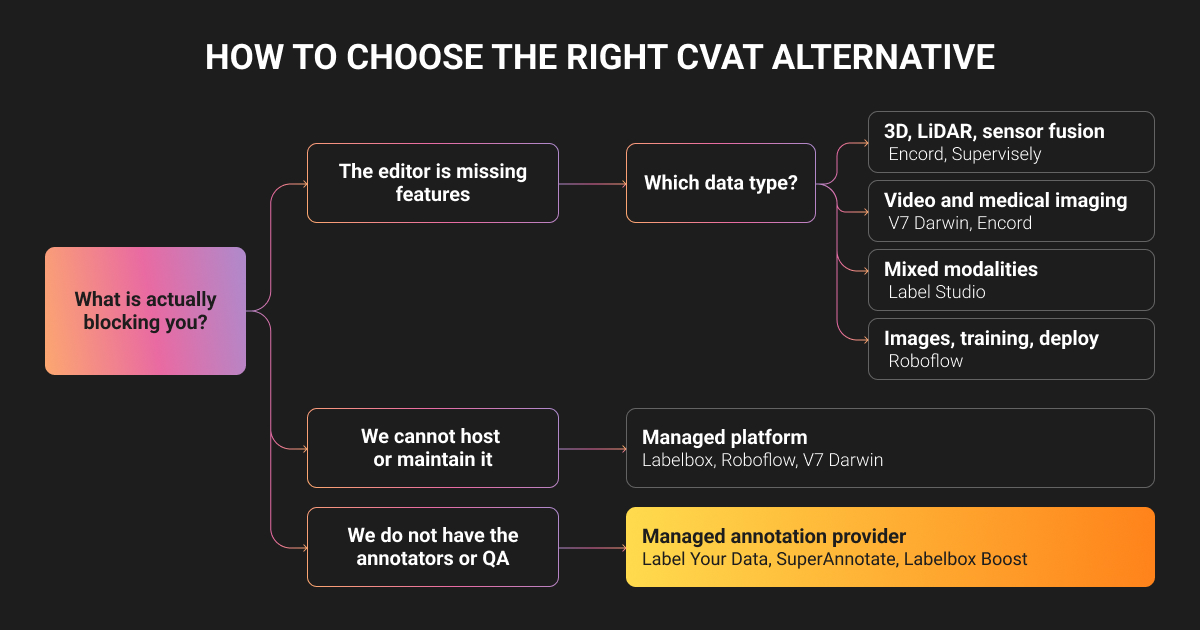
Test CVAT alternatives on crowded scenes, occluded objects, or long sequences from your own dataset. Follow those samples through annotation, review, and export to see where your team still needs to intervene.
Compare each option against these requirements:
- Data and annotation complexity. Check support for your exact task, from segmentation masks to synchronized sensors. To identify the best CVAT alternatives for video annotation, test video annotation tools on sequences with occlusion and reappearance, checking whether object IDs remain consistent.
- Scale and staffing. Evaluate CVAT alternatives for large datasets against your expected volume and number of concurrent users. Test loading, assignment, and export performance, then establish who will manage annotators, resolve questions, and keep delivery on schedule.
- QA and automation. When comparing CVAT alternatives with advanced features, measure how much manual work they actually remove. Test an auto annotation tool on difficult samples, include correction time, and check how reviewers return errors for rework.
- Integrations and exports. Run a sample export through your training pipeline. Check that classes, attributes, coordinates, and track IDs survive the transfer, and verify the APIs and storage connections you need.
- Deployment and security. Confirm where data is processed, who can access it, and whether the proposed deployment meets your organization’s requirements.
- Total cost. Include platform fees, annotation labor, review, compute, maintenance, and migration. Ask vendors to estimate the same workload so their quotes are comparable.
If your team can manage computer vision annotation but needs different capabilities, compare software platforms.
If you need production-ready datasets without managing annotators, QA, and delivery yourself, Label Your Data provides a dedicated team that delivers data annotation services within your existing tools, including CVAT.
About Label Your Data
If you choose to delegate computer vision annotation, run a free data pilot with Label Your Data. Our outsourcing strategy has helped many teams scale their CV projects. Here’s why:
 Data Annotation for Complex Environments
Rely on consistent, high-quality output for complex datasets, detailed taxonomies, and edge cases.
 Structured Quality From Pilot to Production
Get quality engineered into every step through onboarding, evolving guidelines, QA, and continuous feedback.
 Flexible and Scalable Operations
Adjust team capacity, project size, and delivery model as you scale, with no setup fees or long-term lock-ins.
 An Integrated Delivery Partner
Align on goals, workflows, and expectations with a team that integrates into your process from day one.
 Projects Led by Annotation Experts
Work with former annotators who understand annotation complexity, quality standards, and high-volume delivery.
FAQ
What is a computer vision annotation tool?
A computer vision annotation tool lets you label images, video, or 3D data for model training and evaluation. Labels can identify an object’s category, outline its boundaries, mark keypoints, or track its movement across frames.
What is CVAT used for?
CVAT is used to annotate images, video, and 3D point clouds for tasks such as object detection, segmentation, tracking, and pose estimation. It also provides tools for reviewing annotations and exporting labeled datasets into training workflows.
What are the key differences between Roboflow and CVAT?
CVAT focuses on annotation and quality control, with open-source, hosted, and enterprise options. Roboflow connects annotation with dataset versioning, preprocessing, model training, and deployment. Consider CVAT if you want annotation integrated into your existing pipeline, and Roboflow if you want more of that pipeline in one platform.
Is CVAT free to use?
Yes. CVAT Community is free and open source, but you cover hosting, maintenance, and annotation labor. CVAT Online also has a limited free plan, with paid plans for additional capacity and features. Enterprise deployments are paid.
What is the best annotation tool for computer vision?
The best annotation tool fits your computer vision data, review process, and training pipeline. Test shortlisted platforms on the same samples and compare annotation quality, correction time, and total cost.
If recruiting annotators, coordinating reviews, and managing deadlines take time away from model development, consider managed annotation service provider. Label Your Data handles those operations within your preferred tools, including CVAT, so you can expand annotation capacity without building and supervising an in-house labeling team.
Written by
CEO of Label Your Data
Karyna is the CEO of Label Your Data, a company specializing in data labeling solutions for machine learning projects. With a strong background in machine learning, she frequently collaborates with editors to share her expertise through articles, whitepapers, and presentations.