


 Back to blog
Best AI Models: 2026 Costs & Use Cases Comparison

 CEO of Label Your Data


Table of Contents

- TL;DR
- Best AI Models in 2026: Quick Comparison
-
10 Best AI Models in 2026 for Coding, Reasoning, and Multimodal Tasks
- Gemini 4 Argon: Best for long-context multimodal analysis
- Claude Opus 5.5: Best for complex, open-ended work
- GPT-6 Astra: Best for demanding reasoning workflows
- GPT-6.1 Sol: Best for reasoning on a tighter budget
- Claude Sonnet 5.5: Best for everyday software development
- Kimi K3.1 Pro: Best for open-weight reasoning
- Muse Wonder 1.0: Best for agents working across media
- DeepSeek V4.1 Flash 1017: Best for cost-sensitive processing
- GLM-5.3: Best for open-weight coding workflows
- Gemini 3.8 Flash: Best for adjustable reasoning effort
- Other AI Models Worth Considering for Production
- How to Choose the Best AI Model for Your Use Case
- Is a Higher-Performing AI Model Worth the Cost?
- About Label Your Data
- FAQ
TL;DR
- The best AI models for your product handle real workloads reliably while keeping errors, response times, and operating costs within your limits.
- Shortlist Claude Sonnet 5.5 for coding, Gemini 4 Argon for multimodal tasks, and GPT-6.1 Sol for reasoning on a tighter budget.
- A higher benchmark score is worth paying for when it translates into fewer costly errors or less manual work on your tasks.
- Cheap tokens can lead to expensive results once you add retries, tool calls, and human corrections.
- Test models on the same representative, human-reviewed data to see which consistently meets your quality, speed, and cost requirements.
The best AI models for your machine learning project need to deliver accurate results within your budget and response time requirements. Low API prices won’t save you money if you spend more on retries and manual fixes. And a higher benchmark score doesn’t always mean a model is worth the extra cost.
This comparison covers ten language models and multimodal AI models, their strengths in reasoning and coding, API prices, benchmark task costs, and limitations for production use.
Use it to shortlist models for testing on representative, human-reviewed data. What matters is how reliably each model handles your tasks and how much you spend to get results you can use.

For production work, I don't pick a single best model, and I'd be wary of anyone who does. The leaders change every few months, and the gap between them on any given task is often smaller than the gap between a good and a bad prompt. The real question is which model passes your evaluation, on your data, at a cost and speed you can sustain.

 Technology Leader, Deloitte
Best AI Models in 2026: Quick Comparison
Claude Opus 5.5 has the highest overall benchmark score among these ten models. GPT-6.1 Sol offers a lower-cost option with a relatively small score gap, while DeepSeek V4.1 Flash 1017 has the lowest measured task cost in this selection.
| Model | Provider | Use case to evaluate | Intelligence Index | Average benchmark task cost |
| Gemini 4 Argon | Long-context text and image analysis | 50 | $4.97 | |
| Claude Opus 5.5 | Anthropic | Complex reasoning and tasks requiring sustained judgment | 59 | $10.04 |
| GPT-6 Astra | OpenAI | Demanding reasoning tasks | 57 | $6.24 |
| GPT-6.1 Sol | OpenAI | Reasoning with a tighter cost budget | 55 | $1.27 |
| Claude Sonnet 5.5 | Anthropic | Feature development, debugging, and code review | 55 | $10.02 |
| Kimi K3.1 Pro | Moonshot AI | Reasoning with an open-weight model | 46 | $3.68 |
| Muse Wonder | Meta | Tasks combining text, images, audio, and video | 44 | $6.95 |
| DeepSeek V4.1 Flash 1017 | DeepSeek | High-volume tasks where processing cost matters most | 33 | $0.60 |
| GLM-5.3 | Z.ai | Coding and multi-step technical workflows | 32 | $5.01 |
| Gemini 3.8 Flash | Agent workflows with adjustable reasoning effort | 31 | $7.77 |
Benchmark figures come from Artificial Analysis’s leaderboard and individual model pages. Use-case labels are our editorial assessment of the documented capabilities. Task cost is the weighted average spend per benchmark task, including input, cached, reasoning, and answer tokens. It isn’t a token price or a forecast of your production costs.
10 Best AI Models in 2026 for Coding, Reasoning, and Multimodal Tasks
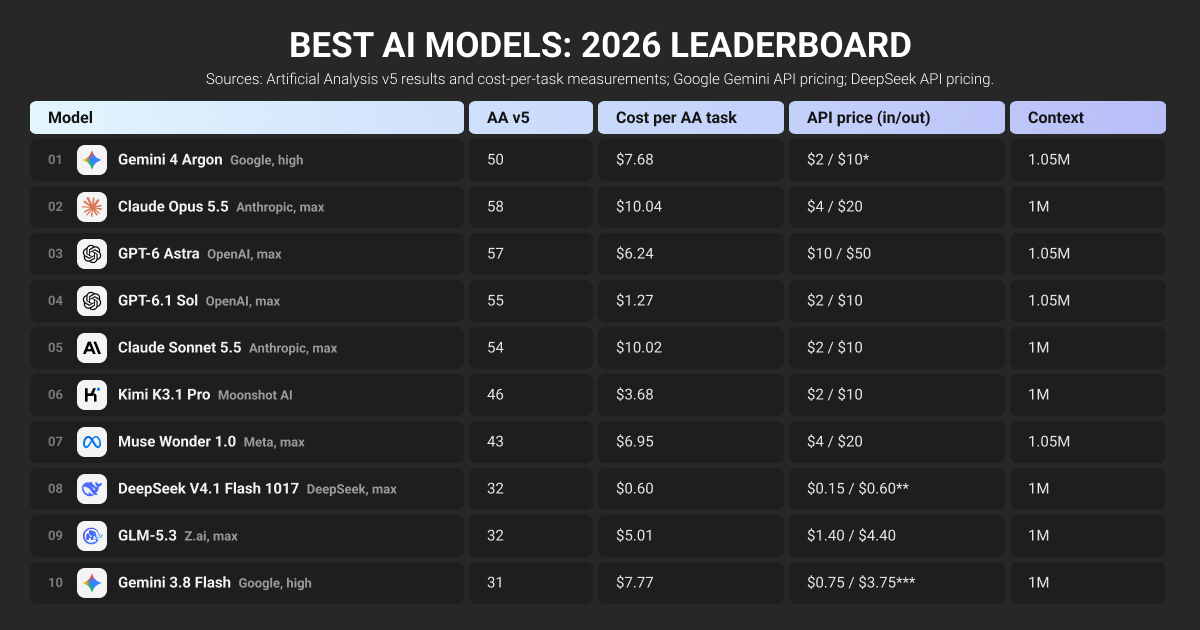
API prices below are in USD per million uncached input and output tokens, checked November 2026. Benchmark comparisons use the settings listed in the table above.
Gemini 4 Argon: Best for long-context multimodal analysis
Consider Gemini 4 Argon when a task combines long documents, images, audio, or video. Its unified 1M-token context window and built-in search, code execution, and function calling support workflows that need several types of input.
At High effort, it scores 50 and costs $4.97 per benchmark task. API rates are $2 input and $10 output through November 30, rising to $4 and $20 on December 1. Account for that increase when estimating production costs.
Claude Opus 5.5: Best for complex, open-ended work
Shortlist Claude Opus 5.5 for tasks that require sustained judgment, such as planning changes across a codebase or resolving problems with unclear requirements. Anthropic’s evaluations distinguish it from Sonnet 5.5 most clearly on complex, open-ended work. Standard API rates are $4 input and $20 output.
Its score of 59 leads this selection, but its $10.04 benchmark task cost is also the highest. Use it where better results reduce enough failed attempts or review work to justify the spend.
GPT-6 Astra: Best for demanding reasoning workflows
GPT-6 Astra supports complex reasoning, coding, computer use, and research, with five reasoning effort levels. Its API costs $10 input and $50 output. Prompts above 272K input tokens trigger higher rates for the entire request.
The main limitation is its position against newer releases. Astra scores 57 at $6.24 per benchmark task; GPT-6.2 Astra scores 62 at $4.00. Existing users should test the newer version before expanding their deployment.
GPT-6.1 Sol: Best for reasoning on a tighter budget
GPT-6.1 Sol is worth testing when you need complex coding, computer use, or document work without Astra’s token prices. It costs $2 input and $10 output, with adjustable reasoning effort. Tool calling requires the Responses API.
At Max effort, Sol scores 55 and averages $1.27 per benchmark task. That makes it a useful cost baseline, although Max effort doesn’t make it a fast option. For new projects, include its successor, GPT-6.2 Sol, in the same evaluation.
Read also: Gemini vs ChatGPT: Comparing Top AI Models
Claude Sonnet 5.5: Best for everyday software development
Sonnet 5.5 fits well-defined development tasks: implementing features, fixing bugs, and reviewing code. It costs $2 input and $10 output. Anthropic reports a CursorBench 4.0 score of 55.5%, compared with Opus’s 57.8%, supporting its inclusion among the best AI models for coding.
Don’t assume its lower token prices guarantee cheaper completed work. At Max effort with Default Fallback, its benchmark task cost reaches $10.02, almost matching Opus. Test lower effort settings before making Max your default.
Kimi K3.1 Pro: Best for open-weight reasoning
Kimi K3.1 Pro deserves a place on the shortlist when access to model weights matters alongside reasoning quality. It supports text and image inputs with a 1M-token context window and scores 46, ahead of the other open-weight models in this selection.
Standard API rates are $2 input and $10 output. Its main trade-off is speed: Artificial Analysis measures 38.4 minutes per benchmark task. That makes it more suitable for work that can run in the background than tasks with strict response deadlines.
Muse Wonder 1.0: Best for agents working across media
Muse Wonder supports agents that work with text, images, audio, video, and PDFs. It can also operate computer interfaces and coordinate multi-step coding work. Meta recommends starting agentic coding at High effort and reserving higher settings for harder problems.
API rates are $4 input and $20 output; its Max-effort benchmark score is 44 at $6.95 per task. Check the variant carefully: Muse Wonder Full is a separate, more capable model available through Muse Code, not the API.
DeepSeek V4.1 Flash 1017: Best for cost-sensitive processing
DeepSeek V4.1 Flash 1017 is the first model here to test when processing volume makes cost the main constraint. It supports image understanding, structured JSON output, and tool calls. Peak API rates are $0.30 input and $1.20 output; off-peak rates are half that.
Its $0.60 benchmark task cost is the lowest in this selection, but its score of 33 trails the premium models. The savings matter only if it meets your acceptance criteria without enough retries or corrections to erase them.
Read also: DeepSeek OCR: Why Performance Breaks Down on Real-World Documents
GLM-5.3: Best for open-weight coding workflows
Evaluate GLM-5.3 for repository changes, refactoring, and technical tasks involving several tool calls. Z.ai positions it for complex engineering and long-running agents. API pricing is $1.40 input and $4.40 output.
Its score of 32 and benchmark task cost of $5.01 make workload-specific testing essential: lower token prices haven’t translated into lower task costs than Kimi or DeepSeek here. It also accepts text only, so workflows involving screenshots need a separate vision model.
Gemini 3.8 Flash: Best for adjustable reasoning effort
Gemini 3.8 Flash lets teams choose Low, Medium, or High thinking effort within the same model. It supports code execution, function calling, and structured outputs, making it worth testing for workflows with different reasoning demands.
API rates are $0.75 input and $3.75 output through December 31, then double. Despite those low token prices, High effort costs $7.77 per benchmark task for a score of 31. Test the effort setting you’ll deploy rather than assuming “Flash” means cheap or fast.
Read also: DeepSeek vs ChatGPT: Which AI Model Is Better
We take a few hundred of our hardest documents: messy PDFs, two-column journal layouts, footnotes in the middle of sentences, equations. Then we run the same document through each model many times. We're not looking for the prettiest output. We're looking for the narrowest spread between its best and worst result. Claude won because it was the most predictable, and predictability is what lets you build a product on top of something.
 CEO & Founder, Listening.com
Other AI Models Worth Considering for Production
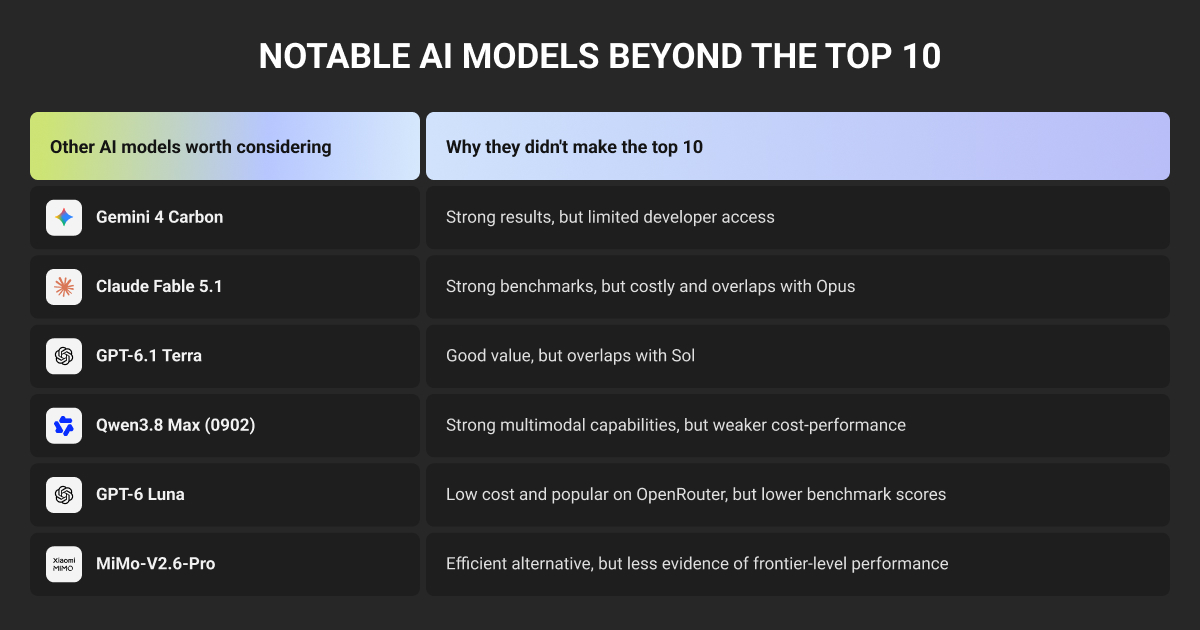
These six models expand the shortlist for harder reasoning tasks, visual workflows, or lower processing costs. Gemini 4 Carbon now has API access, and Claude Fable 5.2 leads the current Artificial Analysis Intelligence Index. Both merit testing alongside the featured models.
| Model | When to consider it | Main trade-off |
| Gemini 4 Carbon | Complex reasoning, scientific problems, and multimodal analysis. | Overlaps with Argon but scores higher: 60 versus 50. Its benchmark task cost is also higher, at $7.76 versus $4.97. |
| Claude Fable 5.2 | Open-ended engineering and research where errors justify more expensive reasoning. | Scores 65, ahead of Opus’s 59, but averages $26.54 per benchmark task. Its cost makes it a more selective choice. |
| GPT-6.1 Terra | Visual reasoning, technical drawings, and operating application interfaces. | Overlaps with Sol’s general-purpose role, with a stronger emphasis on visual tasks. Scores 51 at $0.96 per benchmark task. |
| Qwen3.8 Max | Text and image workflows already using Alibaba Cloud. | Scores 34 at $10.02 per benchmark task, making its cost harder to justify here. Include its successor, Qwen4 Max, in new evaluations. |
| GPT-6 Luna | Focused, high-volume tasks with clear acceptance criteria. | Its $0.15 benchmark task cost comes with a lower score of 28. Test it on bounded tasks before assigning complex reasoning work. |
| MiMo-V2.6-Pro | Low-cost multimodal processing that can run in the background. | Scores 30 at $0.26 per benchmark task, but averages 34.5 minutes per task in the benchmark. Low cost doesn’t make it a fast option. |
Artificial Analysis Intelligence Index v5.0.1. Settings: Carbon High; Fable Max with Default Fallback; Terra and Luna Max; Qwen3.8 Max (0902) and MiMo-V2.6-Pro as listed.
How to Choose the Best AI Model for Your Use Case
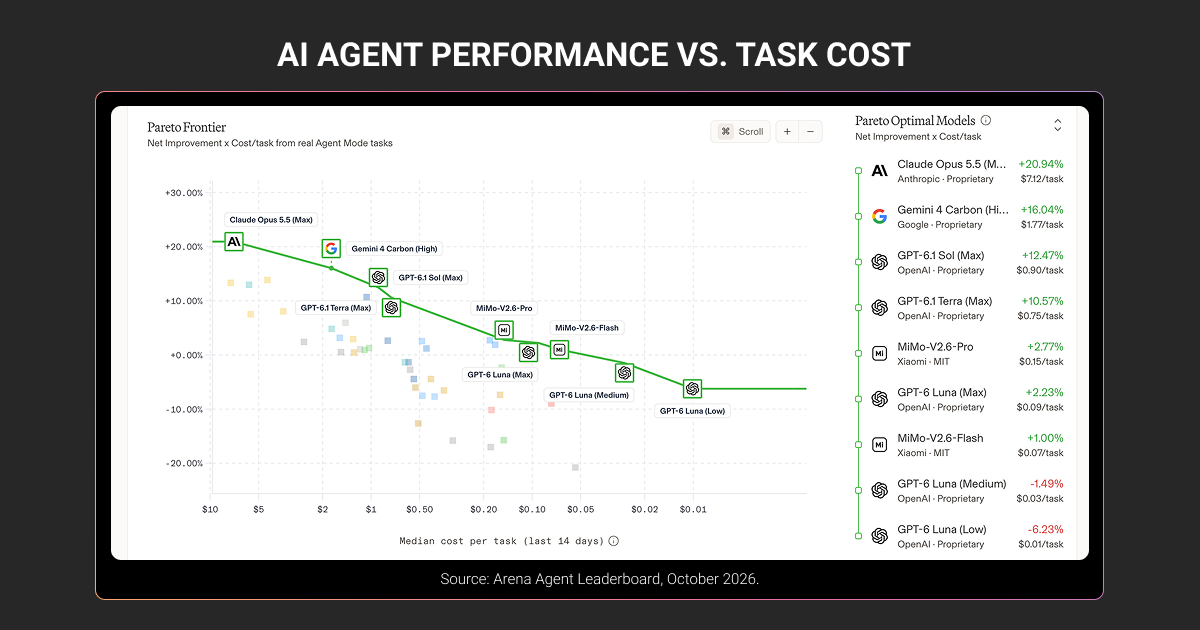
Choose the lowest-cost model that consistently meets your quality and response-time requirements. Public benchmarks help you build a shortlist. Your own evaluation should determine which model you deploy.
Build a golden dataset from representative requests, including common tasks, ambiguous inputs, and costly edge cases. Have reviewers verify the reference answers or acceptance criteria. Test each model on the same cases.
Evaluate four things:
Quality
Define what counts as a correct result. For code, check whether it passes relevant tests. For extraction, verify field values and required formats. For document answers, check whether the supplied evidence supports each claim. For image recognition, check performance on small objects, partial occlusions, and poor lighting.
Cost per acceptable result
Include failed attempts, retries, tool calls, and human corrections. Divide that total cost by the number of results that meet your acceptance criteria. Cheap tokens don’t guarantee cheap completed tasks.
Speed
Measure the time needed to finish the task, including tool calls and retries. Test under expected traffic and check slow responses as well as the average.
Consistency
Repeat tests to see whether successful results hold up across runs. Track specific failures, such as invalid JSON or unsupported claims, so a strong average doesn’t hide recurring problems.
Record the model version, prompts, reasoning settings, and scoring rules so you can repeat the comparison when any of them change.
Before comparing model costs, factor in the cost of preparing your evaluation data: check our data annotation pricing to plan that part of your budget.
Is a Higher-Performing AI Model Worth the Cost?
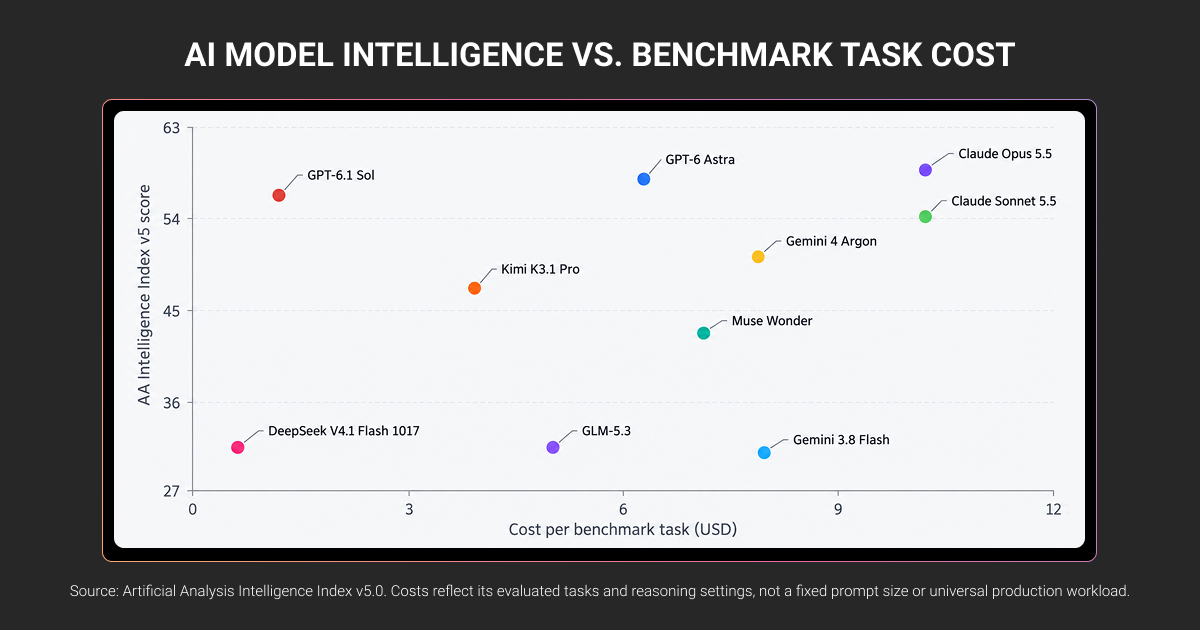
A higher-performing model is worth the extra cost when it prevents enough errors, reduces review work, or completes tasks that cheaper models can’t reliably handle.
Consider Claude Opus 5.5 and GPT-6.1 Sol in Artificial Analysis’s November 2026 results:
| Model and setting | Intelligence Index score | Average benchmark task cost |
| Claude Opus 5.5, Max, Default Fallback | 59 | $10.04 |
| GPT-6.1 Sol, Max | 55 | $1.27 |
Opus scores four points higher at roughly 7.9 times the benchmark task cost. That gap doesn’t tell you how much better it will perform on your workload. The index combines different evaluations; it isn’t a percentage of your tasks completed correctly.
These costs reflect token usage and pricing across the benchmark tasks. They aren’t prices per million tokens or estimates of your production bill.
Use your evaluation results to identify where extra spending pays off. If both models meet your extraction criteria, the cheaper one may be sufficient. If one consistently solves coding tasks that otherwise need an engineer’s intervention, its higher cost may be justified.
You can also route routine requests to a cheaper model and escalate failures to a stronger one. Count the cost and delay of both attempts, and check that your validation catches errors reliably.
These decisions depend on evaluation data you can trust. Label Your Data helps teams prepare annotated machine learning datasets and review model outputs against task-specific criteria. A no-cost pilot lets you test that workflow on a sample of your data before scaling data annotation.
About Label Your Data
If you choose to work with a trusted AI training data provider, run a free data pilot with Label Your Data. Our outsourcing strategy has helped many companies scale their ML projects. Here’s why:
 Data Annotation for Complex Environments
Rely on consistent, high-quality output for complex datasets, detailed taxonomies, and edge cases.
 Structured Quality From Pilot to Production
Get quality engineered into every step through onboarding, evolving guidelines, QA, and continuous feedback.
 Flexible and Scalable Operations
Adjust team capacity, project size, and delivery model as you scale, with no setup fees or long-term lock-ins.
 An Integrated Delivery Partner
Align on goals, workflows, and expectations with a team that integrates into your process from day one.
 Projects Led by Annotation Experts
Work with former annotators who understand annotation complexity, quality standards, and high-volume delivery.
FAQ
Which is currently the best AI model?
As of November 2026, Claude Fable 5.2 at Max effort with Default Fallback leads the Artificial Analysis Intelligence Index with a score of 65. That makes it a candidate for demanding tasks, but its higher cost still needs justification on your workload.
Which AI models are best for what?
Start by matching models to tasks: Claude Sonnet 5.5 for coding, Gemini 4 Argon for multimodal work, and GPT-6.1 Sol for reasoning on a tighter budget. Treat these as testing candidates. Compare them using your actual inputs, acceptance criteria, tools, and response-time limits.
What are the best open source AI models?
Kimi K3.1 Pro and DeepSeek V4.1 Flash 1017 are worth evaluating if you need downloadable weights. Distinguish open weights from open source: Kimi uses a custom license, while DeepSeek lists MIT. Check license terms, hardware requirements, and serving costs before choosing either model.
Which AI models are best for production use?
The best production model meets your acceptance criteria under expected traffic, within your cost and latency limits. Evaluate tool-call reliability, structured outputs, failure handling, and version stability alongside answer quality. Also check whether the provider’s data handling and deployment options fit your requirements.
What’s the best way to test AI models?
Run each candidate on the same representative, human-reviewed dataset. Define pass criteria before testing, repeat difficult cases, and record failures, latency, and cost per accepted result. Use automated checks where possible, with human review for judgments that tests or model-based graders can’t reliably resolve.
Which AI model is better than ChatGPT?
ChatGPT is an application, so the comparison depends on the model and tools used within it. Compare a specific configuration against alternatives on the same tasks. A model that produces better code may still perform worse on document analysis, response time, or cost.
Written by
CEO of Label Your Data
Karyna is the CEO of Label Your Data, a company specializing in data labeling solutions for machine learning projects. With a strong background in machine learning, she frequently collaborates with editors to share her expertise through articles, whitepapers, and presentations.