








 Back to blog
Kaggle Datasets: How to Work with Public Data

 CEO of Label Your Data


Table of Contents


TL;DR
- Kaggle is a Google-owned platform with thousands of free, public datasets used by ML engineers and data scientists for training and testing models.
- Check the license, the labels, and how the data was collected before you use a Kaggle dataset in a real model.
- Kaggle datasets are built for competitions, not your specific project, so you'll likely need to add edge cases or rare classes to match your real data requirements.
- Kaggle datasets often contain duplicate or near-duplicate images and rows, and if these end up split across your training and test sets, your model's accuracy will look better than it really is.
- A dataset can have perfectly formatted CSV or image files and still have mislabeled rows, so spot-check a sample against the original source or ground truth before you trust the rest.
Kaggle hosts more than 500,000 public datasets, and it’s usually the first stop for anyone building a machine learning model. But a dataset that looks ready to use rarely is.
Class balance, label quality, and domain coverage are built for whatever competition or use case the original uploader had in mind, not yours. Skip that check, and you’ll find out the hard way, after training, when your model’s accuracy doesn’t hold up outside the test set.
In this guide, you’ll find how Kaggle datasets are structured and licensed, how to search for the right one, and how to tell when one’s ready to train on versus when it needs more work first, with help from a specialist AI training data partner like Label Your Data.
Read on to learn how to turn public datasets into solid training data for your model.
What Is a Kaggle Dataset? Common Types and Formats
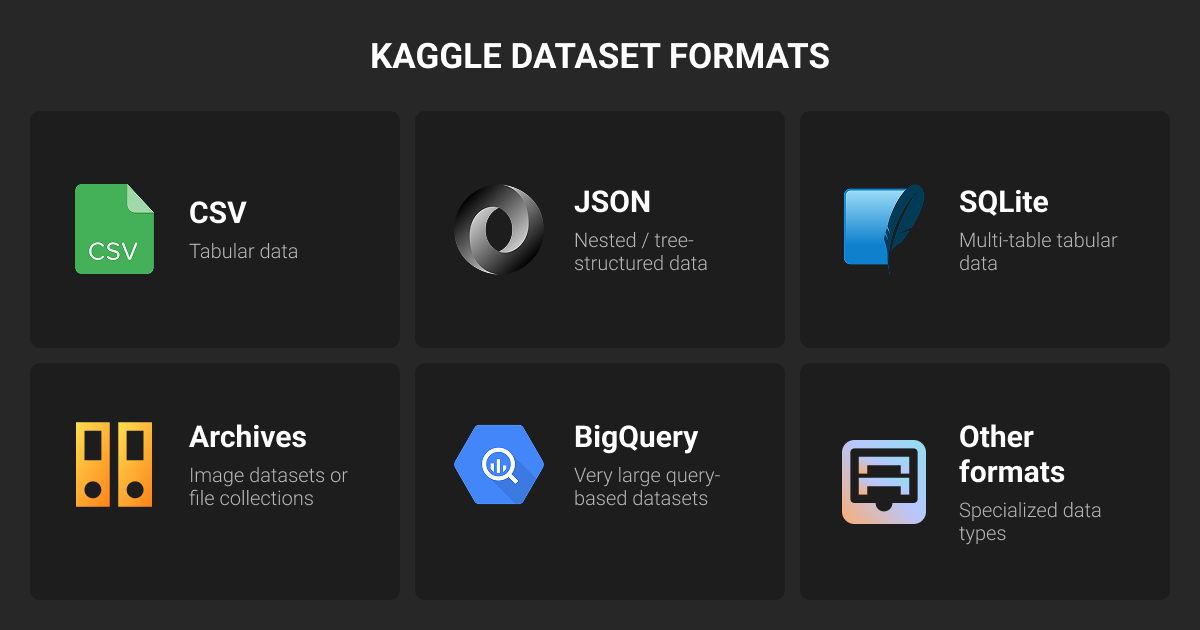
Kaggle is a platform with more than 500,000 public datasets, 1.5 million public notebooks, and over 10,000 pre-trained models, built by a community of 25 million registered users.
A Kaggle machine learning dataset can land as a flat CSV, a compressed Parquet file, a ZIP of images, or a nested JSON tree, and the format shapes how much work stands between download and training data.
Here are the formats you’ll run into most.
Tabular Kaggle datasets
Kaggle supports a few tabular formats, and the right one depends on size and structure:
- CSV is the default, rows and columns, previewed in Kaggle’s Data tab, though it doesn’t preserve data types well, so dates often need cleaning after import.
- Parquet is compressed and column-based, faster to load and lighter than CSV on large datasets, though less convenient to open manually.
- SQLite shows up when records are linked across several tables, and it needs a SQL query instead of a simple file open.
Check which format is available before you download, and confirm it fits your tools and workflow.
Image and video Kaggle datasets
Almost nothing on Kaggle comes as raw individual image or video files. It’s packaged as a ZIP or 7z archive that you unpack server-side, so inside a notebook you’re just reading files directly, no unzipping required.
Some image datasets carry more than one label per file: bounding boxes for object detection, or segmentation masks for pixel-level classes. The annotation format varies too, COCO-style JSON, Pascal VOC XML, and YOLO text files all show up, and they’re not interchangeable without conversion.
Most of these sets fit straightforward image recognition, but check the annotation format before you assume that's what you’re getting.
Text and NLP Kaggle datasets
Text doesn’t have its own dedicated format on Kaggle the way tabular data has CSV. Some of the top NLP datasets on Kaggle come as either CSV, when the data is flat, one row per review or document, or JSON, once the structure gets nested, like conversation threads or multi-layered annotations.
Kaggle renders JSON as an expandable tree in the preview, so you can check the structure before writing any parsing code.
Audio Kaggle datasets
Audio data is less common on Kaggle than CSV, JSON, or image archives. Audio Kaggle datasets for machine learning projects usually contain WAV or MP3 files packed into a ZIP, with labels and other details sitting in a separate CSV or JSON file.
Check the metadata file first: it should explain how filenames connect to labels, timestamps, or speakers. Without that link, even a well-organized folder of recordings is hard to use.
Time-series Kaggle datasets
Most time-series Kaggle datasets come as a regular CSV with a timestamp column, common for sensor readings, sales records, and weather data.
For larger or more complex series, you’ll sometimes see HDF5 or NPZ files instead. They handle large arrays well but are harder to inspect at a glance, and you’ll usually need Python and the right library to open them.
How to Search for Kaggle Datasets for Machine Learning
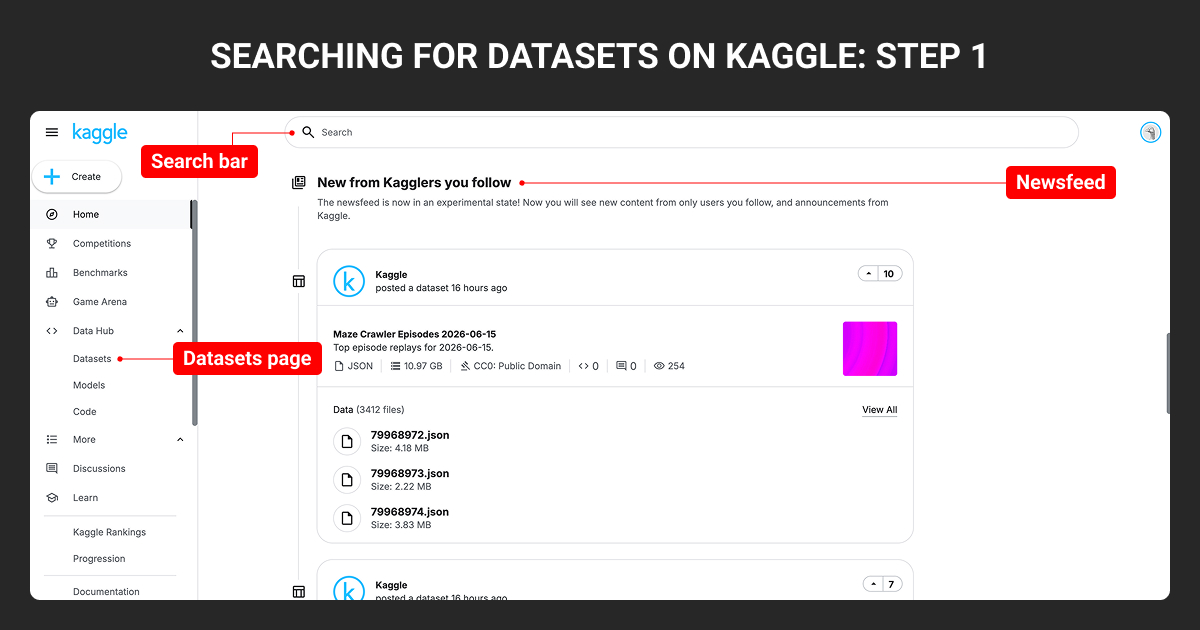
There are two ways to find a Kaggle dataset for your project: browse until something looks right, or search with a specific need in mind. Most ML practitioners end up doing both.
Check the newsfeed
The newsfeed shows recent posts from people you follow, mixed with new datasets Kaggle is surfacing. It’s not very useful until you’ve followed a few people whose work you trust. But once you do that, it’s a decent way to catch new Kaggle datasets as they land.
Browse the datasets page
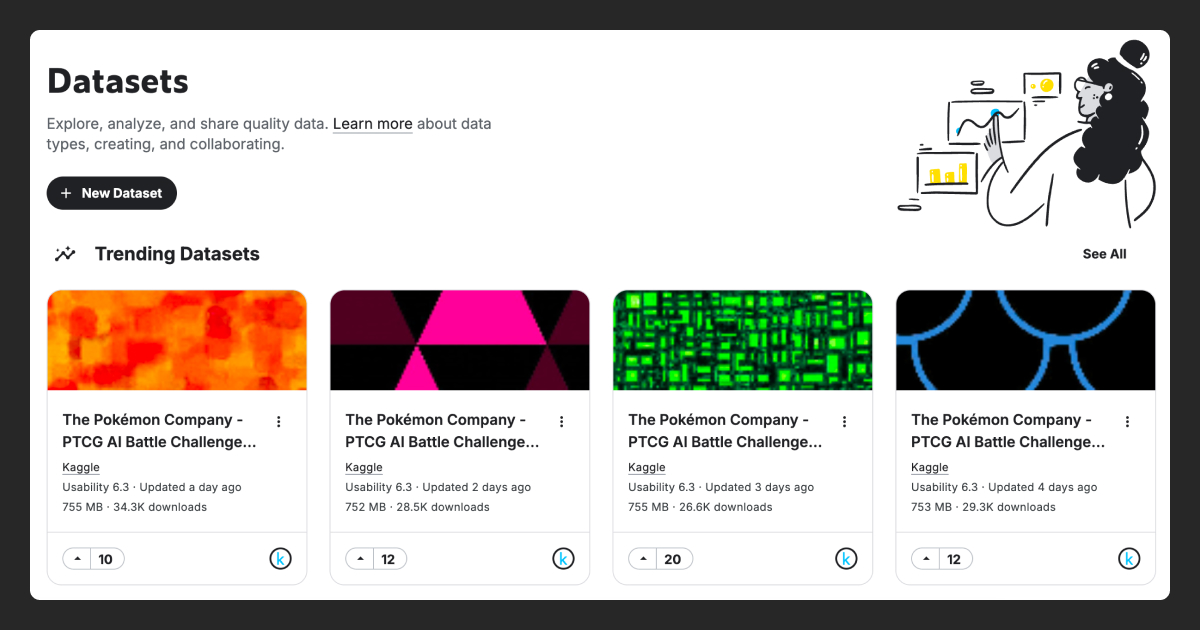
This is the best starting point for most people. Kaggle datasets site organizes datasets by category, biology, social science, computer vision, and so on, with trending and popular datasets pulled to the top of each section. Every card shows the usability score, file count, size, and upvotes, so you can tell in a couple seconds whether something's worth clicking into.
Search by keyword
Once you know roughly what you’re after, the search bar is the fastest way in. Type a keyword and Kaggle matches it against titles, descriptions, and tags. Knowing you want “credit card fraud” or “chest x-ray” beats scrolling through categories.
Narrow down with filters
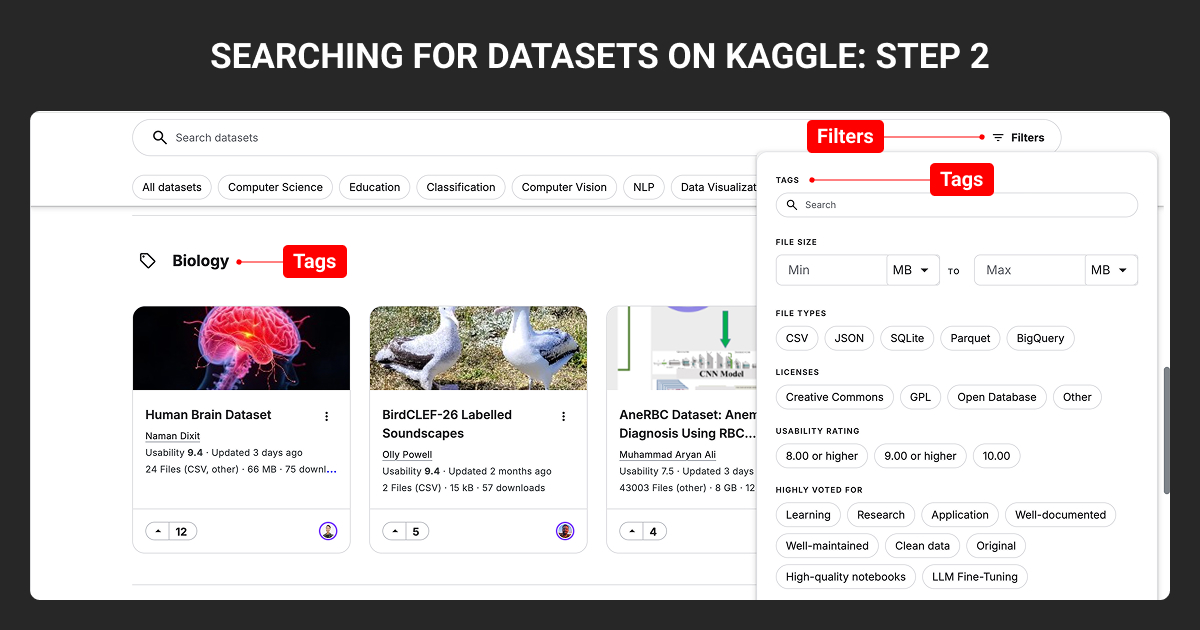
Filters make yourKaggle dataset search more useful. Set a minimum usability rating, or filter by file type, size range, or license if commercial use is part of the plan.
There’s also a “highly voted for” section based on what other users tagged the dataset as being good for: well-documented, clean data, ready for LLM fine-tuning. Worth checking before you open anything.
Browse by tag
Tags work more like browsing than searching. Click a tag like computer vision, NLP, or classification, and the results narrow to that topic. Stack a tag with a filter, NLP datasets rated 9 or higher, say, and you’ve got a shortlist without opening a single dataset page.
Save datasets with bookmarks
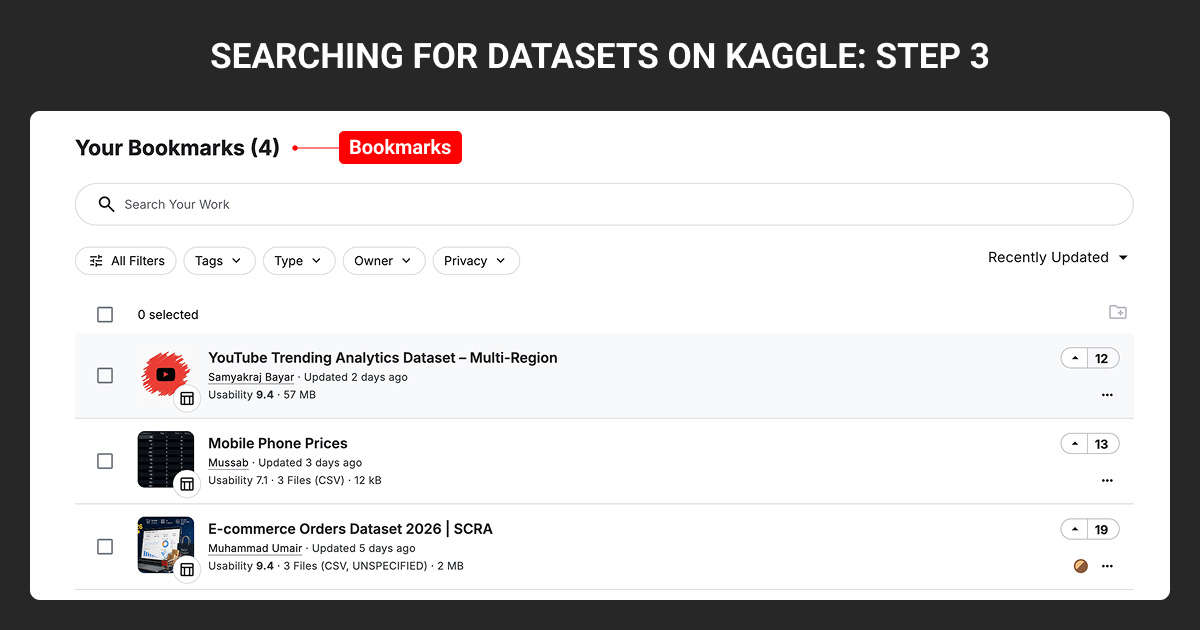
Bookmarks keep your shortlist in one place instead of scattered across browser tabs. Hit the bookmark icon on any dataset and it lands in Your Bookmarks, showing the same at-a-glance info: usability score, file count, size, upvotes.
You can filter a long list by tag, type, or owner, and sort by recently updated to catch when a saved dataset gets a fresh version. If you’re evaluating five or six candidates, this is where you park them.
How to Use Kaggle Datasets for ML Projects
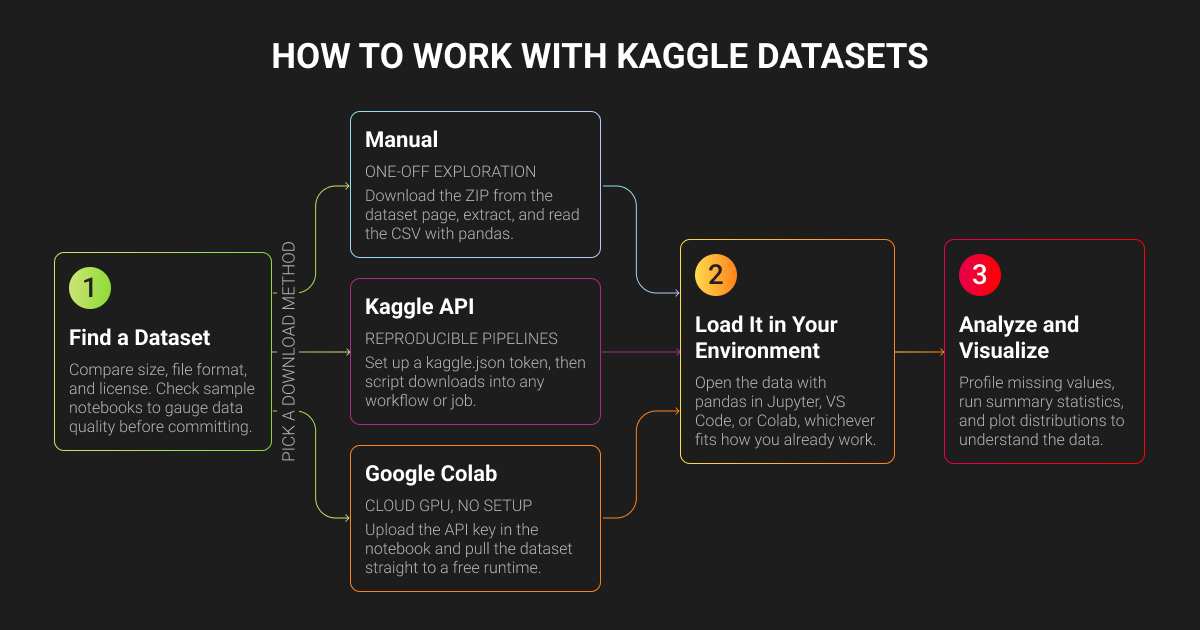
Before a Kaggle dataset goes into your pipeline, you need to know whether its schema, data annotation tags, splits, and license actually fit the job. Then comes the less visible work: checking the data, cleaning it up, and adapting it for training or benchmarking.
How to download dataset from Kaggle
There are three ways to get a Kaggle dataset into your working environment. Which one you use depends on what you’re doing with it.
| Download method | ML use case | How to download a dataset |
| Manual download | Quick checks, one-off use | Download the ZIP, unzip it, and open the CSV in pandas. No setup needed, but not worth repeating. |
| Kaggle API | Pipelines, repeat use | Set up a kaggle.json token once, then download with a single line of code instead of clicking through the site. |
| Google Colab | Large datasets, no local GPU | Upload your API key, pull the dataset into a Colab runtime, and train using Colab's free GPU. |
These methods aren’t mutually exclusive. Most people start with a manual download, then switch to the API once a dataset is worth building a real pipeline around.
How to load a Kaggle dataset into your environment
Use the right library for the file type and point it to the dataset path. At this stage, the goal is just to confirm everything loads correctly, not to start building the model.
In Google Colab, runtime files disappear when the session resets, so save important files to Google Drive or rerun the download step when you need them again.
How to check dataset licenses
Kaggle datasets site lists a license on every dataset’s page. Read it before building anything, “public” doesn’t mean “free to use.”
- CC0 datasets are public domain; use them commercially without a second thought.
- CC-BY datasets need attribution but are still straightforward.
- Other CC licenses may block commercial use entirely or require you to share derivative work under the same terms, which can kill a proprietary product.
- GPL-style licenses carry similar restrictions, sometimes requiring anything built with the data to be open-sourced too.
Many Kaggle public datasets exist for personal projects or testing an idea, not commercial use. That’s fine if you’re doing the same, but it’s a problem if you’re shipping a real product.
If a dataset has no license, or just says “for research purposes,” treat that as a hard no for commercial use rather than interpreting it in your favor. Get clarification from the publisher first.
You can filter by license type from the start. If commercial use is non-negotiable, filter for Creative Commons or Open Database licenses, five minutes checking this now beats finding out after the model’s in production.
How to evaluate Kaggle dataset quality
A perfect license doesn’t guarantee a usable Kaggle dataset.
Start with the labels: pull a sample, a hundred rows is enough, and check if they match what you’d expect. Watch for vague categories, inconsistent labeling, or too much dumped into “other.” If you can’t explain a label from a few examples, that’s a bad sign for the rest of the dataset.
Class balance matters more than people think. A dataset can look large overall and still barely cover the class you actually care about: fraud, defects, rare disease cases. Check the distribution before training anything. If your problem depends on catching rare events and the data barely has any, no model architecture can fix that.
Data leakage is the one that wrecks results quietly, and it’s usually about the split, not duplicate rows. If a random split puts frames from the same video, sessions from the same user, or scans from the same patient on both sides of train and test, your model can score well by memorizing the source instead of the pattern.
A dataset can hit 0.95 AUC on a row-level split and drop hard once you split by source instead. Check what your train and test sets are actually drawn from before you trust either.
Popular Kaggle Datasets Download by Use Case
Here are some of the most downloaded, highest-rated Kaggle datasets for machine learning projects, organized by the problem they solve.
Kaggle classification datasets
Classification datasets sort inputs into categories, whether that's predicting an outcome from tabular data or sorting images into classes, and picking the right machine learning algorithm starts with knowing which type of problem you’re solving.
- The Kaggle Titanic dataset is a binary classification dataset based on passenger survival.
- The Kaggle dogs vs cats dataset is a two-class image classification dataset.
Both are common benchmarks for testing a classification workflow before you point it at real data.
Kaggle healthcare datasets
Healthcare data supports tasks like disease prediction, patient risk assessment, and churn analysis.
- The Pima Indians diabetes database predicts diabetes from diagnostic measurements.
- The heart disease dataset classifies heart disease risk from patient attributes.
Check the data source, patient population, and coverage before using either for anything beyond a prototype.
Kaggle financial datasets
Finance datasets on Kaggle typically cover fraud detection, insurance pricing, and risk analysis.
- Credit card fraud detection classifies anonymized transactions as fraudulent or genuine.
- Medical cost personal dataset is one of the more popular Kaggle regression datasets, using demographic and health data to predict individual insurance charges.
Watch for class imbalance in fraud data specifically, genuine transactions vastly outnumber fraudulent ones, which can make a model look accurate while missing the fraud entirely.
Kaggle customer churn datasets
Churn looks different across industries: cancelled contracts, inactive accounts, lost policyholders, or patients who stop using a service.
- Telco customer churn includes service usage, account details, demographics, and churn status.
- The Hospital patient churn dataset Kaggle uses synthetic data to predict patient churn from engagement and satisfaction metrics.
The definition of “churn” matters more than the dataset itself. A cancelled contract and 30 days of inactivity are very different prediction targets, and mixing them up will train the wrong model.
How to Adapt Kaggle Datasets for ML Projects
Using a Kaggle dataset in a real machine learning project usually means changing the data, not the model.
Labels rarely match what your product needs. A sentiment dataset might have three classes while your product needs six specific categories. A damage dataset might use “minor” and “major,” while your insurance workflow runs on a different system entirely. That means relabeling against a schema built around your actual decisions.
Another gap is coverage. Kaggle datasets often come from a narrow setting, one region, one device, one time period, while your production data spans conditions the original dataset never saw.
You can relabel in-house, which works for prototypes, but the overhead adds up fast on anything commercial. That’s usually when ML teams bring in a specialist data annotation company like Label Your Data to adapt public and competition-grade Kaggle datasets. Their managed data annotation services are built around custom label schemas and edge-case coverage in domains like computer vision and NLP.
Check our data annotation pricing to compare the real cost against an internal team.
About Label Your Data
If you choose to delegate dataset annotation, run a free data pilot with Label Your Data. Our outsourcing strategy has helped many companies scale their ML projects. Here’s why:
 Data Annotation for Complex Environments
Rely on consistent, high-quality output for complex datasets, detailed taxonomies, and edge cases.
 Structured Quality From Pilot to Production
Get quality engineered into every step through onboarding, evolving guidelines, QA, and continuous feedback.
 Flexible and Scalable Operations
Adjust team capacity, project size, and delivery model as you scale, with no setup fees or long-term lock-ins.
 An Integrated Delivery Partner
Align on goals, workflows, and expectations with a team that integrates into your process from day one.
 Projects Led by Annotation Experts
Work with former annotators who understand annotation complexity, quality standards, and high-volume delivery.
FAQ
Are Kaggle datasets free?
Yes, most Kaggle free datasets can be downloaded at no cost. But you should always check the license before using one in a commercial ML project.
Do you need a Kaggle account to download datasets?
Yes, you usually need a free Kaggle account to download datasets directly from the platform. An account is also required to use the Kaggle API, accept dataset rules, and access files that have additional usage conditions.
What is better than Kaggle?
It depends on what you need. Hugging Face works well for AI datasets, while government portals and academic repositories may offer more specialized or better-documented data.
Which is better, GitHub or Kaggle?
Kaggle is better for finding, previewing, and working with datasets. GitHub is better for storing code, documentation, and version-controlled project files.
How to use Kaggle dataset in Google Colab?
- Connect your Kaggle account by uploading your kaggle.json API key
- Download the dataset into the Colab runtime using the Kaggle API
- Load the files with the right Python library (e.g., pandas)
- Keep in mind that runtime files disappear when the Colab session resets
Written by
CEO of Label Your Data
Karyna is the CEO of Label Your Data, a company specializing in data labeling solutions for machine learning projects. With a strong background in machine learning, she frequently collaborates with editors to share her expertise through articles, whitepapers, and presentations.