


 Back to blog
How to Train an AI Model: Workflow, Data, and Best Tips

 CEO of Label Your Data


Table of Contents

- TL;DR
- What Is AI Training?
- How Much Data Is Needed to Train an AI Model?
- How to Build and Train an AI Model: Tools and Infrastructure
- How to Train an AI Model Step by Step: Process Overview
- Training AI Models by Data Type
- How Long Does It Take to Train an AI Model?
- How Much Does It Cost to Train an AI Model?
- About Label Your Data
- FAQ

TL;DR
- Fine-tuning a pretrained model beats building from scratch for most AI product and ML teams.
- Your data quality, not your compute budget, sets the ceiling on what your model can learn.
- This guide covers a six-step workflow from problem definition to production monitoring.
Training an AI model comes down to three things: properly annotated data, a suitable pretrained model, and a clear success target.
Get the data right, and the rest is machine learning engineering. Get it wrong, and no framework or compute budget will save you.
Open models are widely available in 2026, fine-tuning has removed most infrastructure complexity, and GPU compute costs have dropped sharply. That makes it easier to start, and just as easy to start wrong.
What Is AI Training?
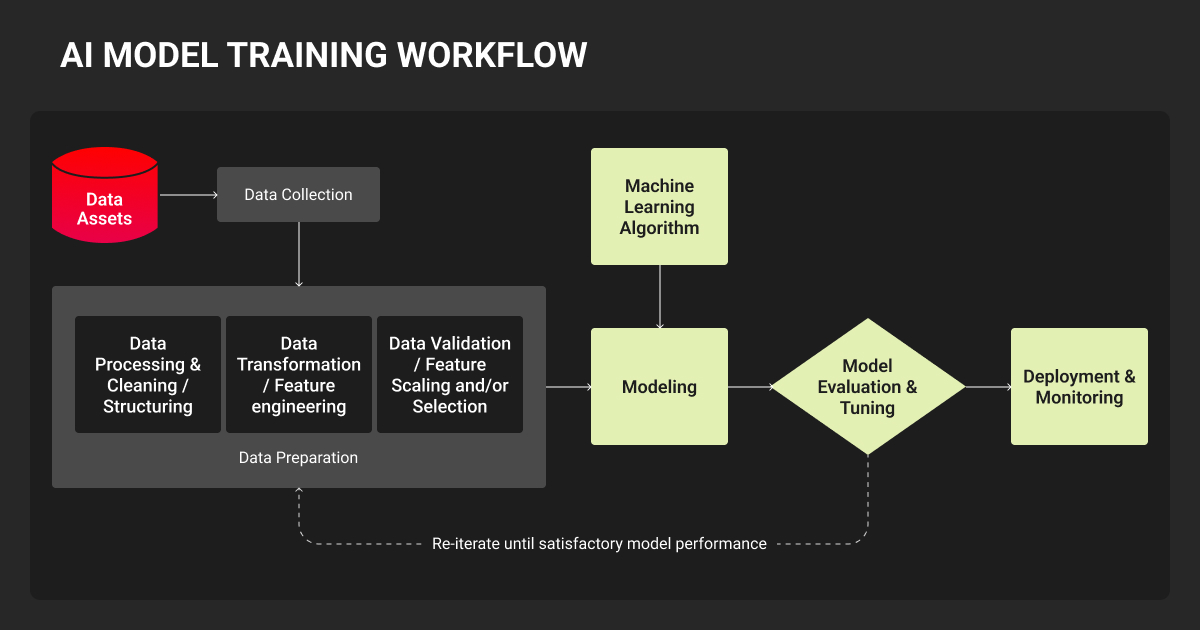
AI model training teaches a model to make predictions from data rather than following hand-coded rules. The model processes labeled data examples, adjusts its internal parameters, and repeats that cycle until it generalizes to new inputs it hasn’t seen before.
For AI product and ML teams, understanding how to train AI starts with choosing the right approach:
| Training type | What it does | When you’d use it |
| Pretraining | Self-supervised learning on massive datasets to build general representations | Only at frontier scale; rarely the right choice for enterprise teams |
| Supervised fine-tuning | Adapts a pretrained model to a specific task using labeled examples | The most common production path; you steer an existing model, not build from scratch |
| Preference alignment | Uses human or AI feedback (RLHF, DPO) to shape model behavior | Essential for instruction-following models and any system where quality judgments matter |
Fine-tuning is not just smaller-scale training. It needs different data, stricter quality controls, and different evaluation criteria. A model fine-tuned on 1,000 curated examples will outperform one trained on 50,000 mediocre ones.
How Much Data Is Needed to Train an AI Model?
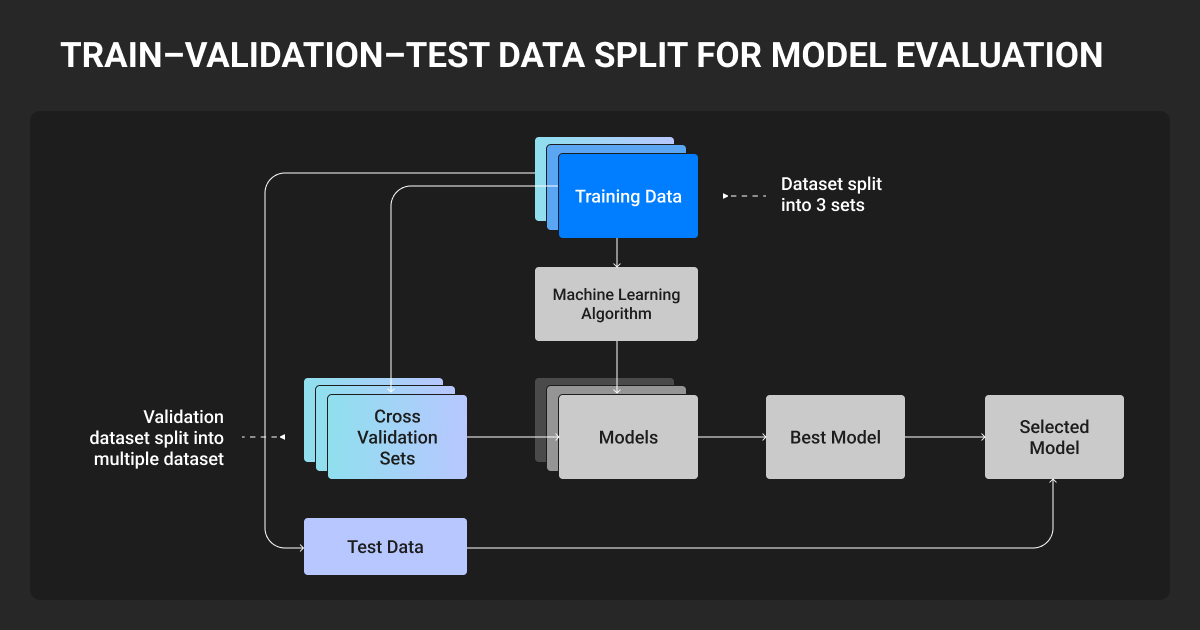
Data quality matters more than volume. Here’s a practical starting point by modality:
- Computer vision: hundreds of well-annotated images per class for fine-tuning
- NLP / LLMs: 500-1,000 curated examples is typically enough for LoRA fine-tuning
- Voice / ASR: a few hours of labeled audio; accent and condition diversity trumps raw hours
Class imbalance: A common failure point
Class imbalance — where training data overwhelmingly represents some categories and barely touches others — is one of the most frequent reasons production models fail.
Focal loss and similar techniques help at the machine learning algorithm level, but the real fix is ensuring your dataset covers edge cases, rare events, and underrepresented conditions with the same rigor as common ones.
In autonomous vehicles, medical imaging, or safety-critical applications, this is what separates a model that works in testing from one that works in the field.
Preparing your training data
The data annotation step (i.e., converting raw data into labeled training examples) determines the ceiling of what your model can learn.
No architecture or compute budget can recover from fundamentally flawed labels. A Google Research study found that data quality issues were pervasive across AI practitioners, with cascading downstream failures that often went undetected until late in the development cycle.
Production-grade annotation is not the same as bulk labeling. It requires:
- Domain-appropriate annotators (not generalist crowdworkers)
- Multi-stage annotation QA before labels enter the training set
- Consistency protocols between annotators
For complex domains (3D point cloud annotation for autonomous vehicles, medical image segmentation, or fine-grained video classification), you need specialist expertise that general crowdsourcing platforms are not built to provide.
Many ML teams at production scale work with a dedicated AI training data solutions provider for exactly this reason. Under-resourced in-house labeling produces machine learning datasets that look complete but quietly undermine model performance in ways that are expensive to fix.
Label Your Data operates as a solution-led, human-first AI data specialist, working directly alongside ML teams to deliver annotation programs across image, video, text, audio, and 3D data with a QA-first delivery model.
Having a specialist AI data provider involved early prevents the problems that kill AI projects before they launch.

One common mistake is letting unsanitized data and outliers into AI model training. Models are highly sensitive to these inputs, and a missed edge case can produce erroneous outputs or runtime errors. In my view, 95% of machine learning is making sure the pipeline around the model is robust. Prioritize data cleaning, outlier handling, and edge-case testing over model selection.

 Machine Learning Engineer
How to Build and Train an AI Model: Tools and Infrastructure
PyTorch is the default for almost all new development. Here’s how the three main frameworks compare:
| Framework | Best for | Key ecosystem |
| PyTorch | Almost all new research and most production use cases | HuggingFace Transformers, TRL, Unsloth, Ultralytics (vision) |
| TensorFlow | Teams with existing TF infrastructure; edge/mobile deployment | TFLite, TF Serving, TFX |
| JAX | Large-scale training on Google TPUs; teams with strong ML engineering depth | Flax, Orbax; smaller community but higher TPU ceiling |
The three major cloud platforms each suit different team profiles:
- AWS SageMaker offers the most flexibility and the broadest hardware selection
- Google Vertex AI has the tightest integration with large-scale data infrastructure and exclusive TPU access
- Azure ML leads on enterprise security, compliance tooling, and Microsoft-stack integration
Experiment tracking comes down to two tools. Weights & Biases is the standard for rich visualization and team collaboration; MLflow is the open-source default for teams that want full control and no licensing cost.
How to Train an AI Model Step by Step: Process Overview
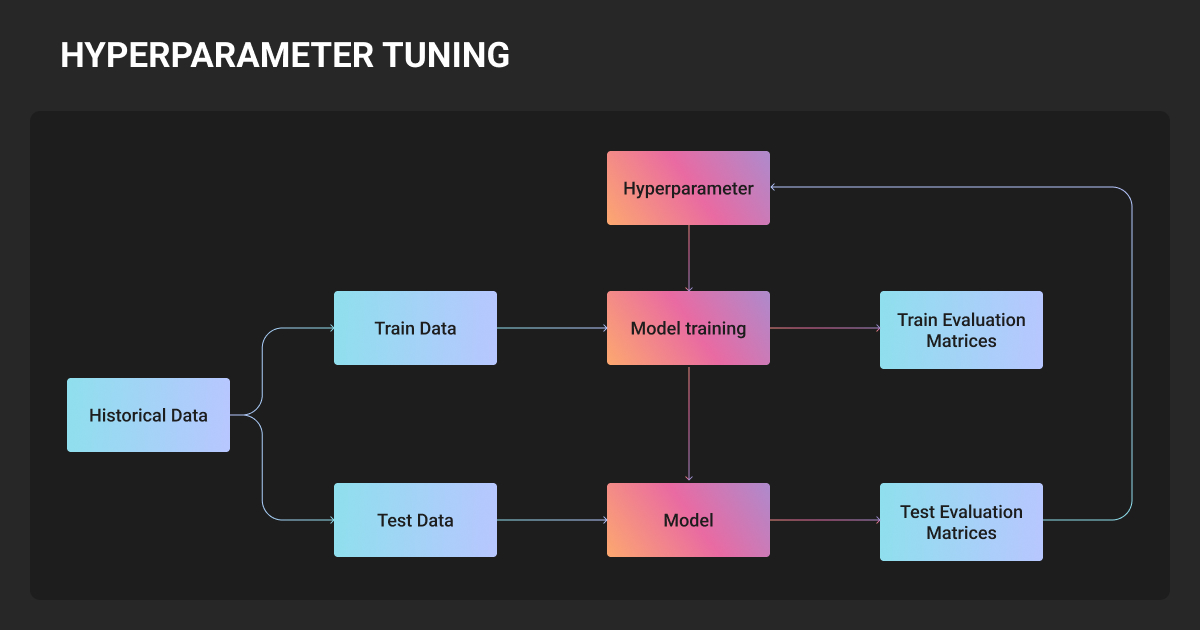
1. Define the problem and set measurable success criteria
Set accuracy targets, latency requirements, and failure mode thresholds before writing a line of code. Vague goals lead to endless iteration; specificity creates a finish line.
2. Collect and annotate your training data
Identify data sources, assess coverage and quality, and build an annotation pipeline before you scale. For proprietary or domain-specific data, this is where working with a specialist data annotation services provider pays the most dividends.
3. Choose your framework and starting model
When you train AI models for production, fine-tuning almost always beats building from scratch.
Start with the smallest pretrained model that fits your task, and scale up only if evaluation demands it. Switching frameworks mid-project is costly; stay in the ecosystem your team already knows.
4. Configure training: hyperparameters, optimizers, and loss functions
Learning rate is the single most impactful hyperparameter. For LLM fine-tuning with LoRA, starting ranges are well-established. Use learning rate scheduling with warmup for vision models. With class-imbalanced data, focal loss is the practical default for detection tasks.
5. Train, monitor, and iterate
Watch training and validation loss curves together; divergence signals overfitting. Use early stopping, log everything, and budget for multiple runs. Finding the right configuration rarely happens on the first attempt.
6. Evaluate, deploy, and monitor in production
Offline metrics like accuracy, mAP, and BLEU are necessary but not sufficient. Test on held-out data that reflects real-world distribution, including edge cases.
In production, watch for concept drift (the gradual shift in input distributions that causes performance to decay). Set retraining triggers, as post-deployment maintenance often costs more than initial development.
Training AI Models by Data Type
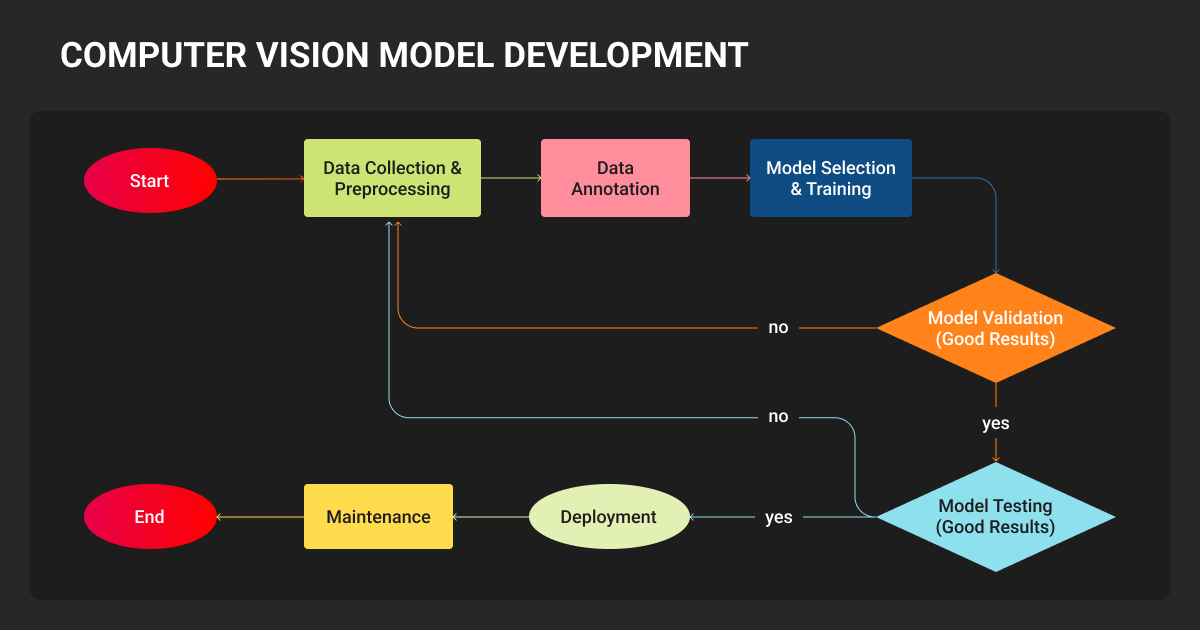
How to train an AI image model
Architecture choice for image models depends on dataset size and task type.
- CNNs (including ConvNeXt) are the most data-efficient and work best for smaller datasets and edge deployment.
- YOLO-series models (YOLO11 and YOLO26 are the current recommended starting points) handle real-time detection and support segmentation, pose estimation, and classification.
- Vision Transformers outperform CNNs with large labeled datasets and tasks that need global context.
Deciding how to train an AI model with images is based on annotation quality. Bounding boxes, segmentation masks, and keypoints all require precision and consistency that determines whether your model learns the right features or pattern-matches on annotation artifacts.
Case in point, Label Your Data delivered ~60,000 polygon masks for NODAR’s depth-mapping models across automotive, agriculture, and industrial scenes, helping reduce validation cycles and hit deployment deadlines across multiple parallel model projects.
How to train an AI voice model
Voice model failures are almost always data problems, not architecture problems. Whisper and wav2vec 2.0 (or Parakeet for faster, more resource-efficient work) are the two main fine-tuning paths.
The most common failure modes are:
- Accent and dialect gaps
- Background noise, compression artifacts, low sample rates
- Hallucination on silence or non-speech audio
Representative, high-quality transcribed audio that covers real production conditions determines ASR performance far more than model architecture does.
How to train an NLP model
- Decoder-only models (LLaMA 4, Qwen 3, Gemma 3, Mistral) are the standard for text generation, summarization, and instruction-following.
- For classification, NER, and retrieval, BERT-family encoders are faster and often more accurate on narrow tasks, and the fine-tuning workflow is the same.
LoRA is the dominant fine-tuning technique; it trains a small fraction of parameters, runs on modest hardware, and typically matches full fine-tuning quality. Major open model families support DPO well, and it has largely replaced the more complex RLHF pipeline for alignment work.
Instruction data quality matters more than quantity; consistent formatting and domain-appropriate examples outperform large volumes of noisily scraped content.
For Guardrails AI project, Label Your Data labeled 1,000 sentences and extracted 5,764 factual claims in 3.5 weeks with zero rework, providing the task-specific training data needed to ship open-source hallucination and financial advice validators now live in Guardrails Hub.
How to train an AI model with stable diffusion
Diffusion model fine-tuning gives you three options:
| Technique | Dataset needed | Output size | Best for |
| DreamBooth | 5–30 images | 2–4 GB | Highest subject fidelity; full model fine-tune |
| LoRA | 10–50 images | 10–200 MB | Production default; modular, combinable at inference |
| Textual inversion | 5–20 images | ~12 KB | Maximum portability; limited expressiveness |
Caption accuracy is the most underestimated variable across all three: the model learns what to associate with your concept from what’s captioned, and inconsistent captions cause most poor output quality regardless of image quality or training duration.
The biggest mistake I see is training an AI model on data that doesn’t reflect real-world conditions. We initially trained on clean documents, but users actually search through scanned PDFs with OCR errors and inconsistent formatting. We intentionally dirtied our training data: accuracy dropped 8% initially, but relevance jumped 34% in production.
 Co-Founder, CompFox
How Long Does It Take to Train an AI Model?
Model training time depends on model size, dataset size, and available compute. Here’s a practical reference:
- LoRA fine-tuning (7B LLM): hours to a day on one GPU
- Vision model fine-tuning (YOLO): a few hours on one GPU
- Full fine-tuning, large model: days to weeks on multiple GPUs
- Training from scratch: months; rarely the right choice
How Much Does It Cost to Train an AI Model?
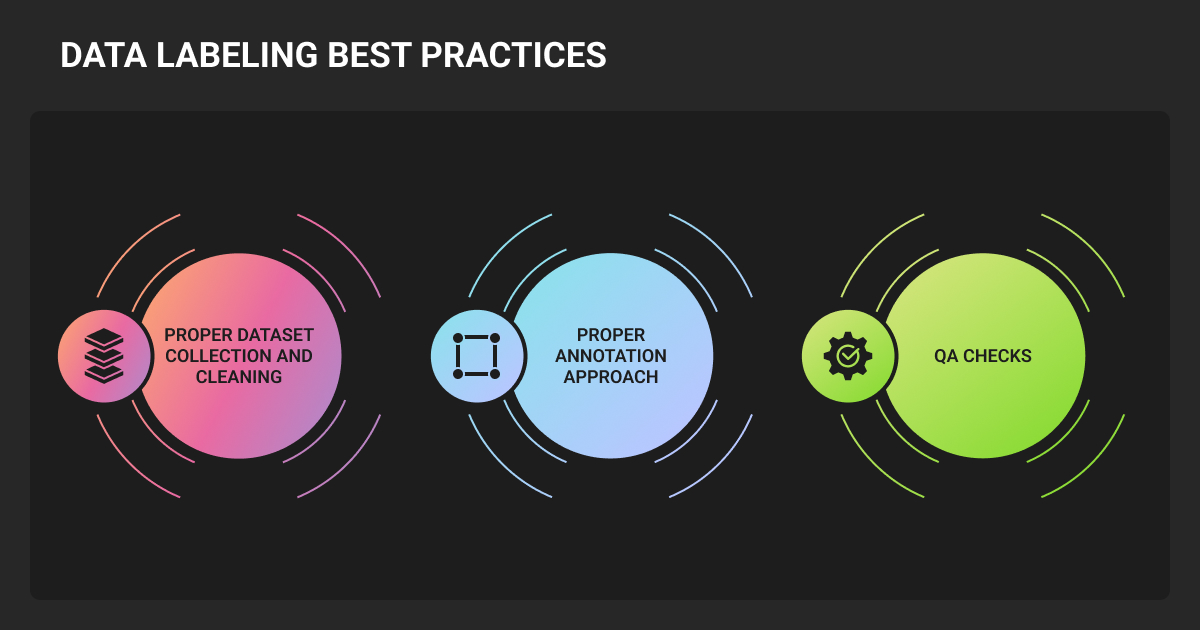
Fine-tuning is cheap. Data preparation is where budgets actually go.
Data preparation typically consumes 20-30% of total project budget, and data scientists spend most of their time on data work, not modeling. Data annotation pricing scales steeply with domain complexity, so factoring this in early prevents the budget surprises that derail projects mid-execution.
About Label Your Data
If your team is scaling an annotation program or needs a trusted training data provider for AI across image, video, text, audio, or 3D modalities, Label Your Data delivers production-grade annotation with human-first QA and domain expertise built in.
 Data Annotation for Complex Environments
Rely on consistent, high-quality output for complex datasets, detailed taxonomies, and edge cases.
 Structured Quality From Pilot to Production
Get quality engineered into every step through onboarding, evolving guidelines, QA, and continuous feedback.
 Flexible and Scalable Operations
Adjust team capacity, project size, and delivery model as you scale, with no setup fees or long-term lock-ins.
 An Integrated Delivery Partner
Align on goals, workflows, and expectations with a team that integrates into your process from day one.
 Projects Led by Annotation Experts
Work with former annotators who understand annotation complexity, quality standards, and high-volume delivery.
FAQ
Is it possible to train your own AI model?
Yes, you can create your own AI model and train it; it’s more accessible than most teams expect. Fine-tuning open models with LoRA can be done on a single consumer GPU or a modest cloud budget. The real barrier is having high-quality, task-specific training data that accurately represents the problem you’re solving.
How is AI trained?
AI is trained by exposing a model to large amounts of labeled data and letting it adjust its internal parameters until it can make accurate predictions. The process runs in repeated cycles: the model makes a prediction, compares it to the correct answer, calculates the error, and updates its weights to reduce that error. This repeats across thousands or millions of examples until performance on a held-out validation set stops improving.
How do I start training an AI model?
Define a precise problem with measurable success criteria, choose a pretrained model from HuggingFace’s Model Hub closest to your task, and prepare a focused, well-annotated dataset.
Use established fine-tuning frameworks: Unsloth or Axolotl for LLMs, Ultralytics for vision, and HuggingFace Diffusers for image generation. Start small, evaluate early, and iterate.
Is it difficult to train an AI model?
The mechanics have become genuinely accessible; a LoRA fine-tune can be configured in under an hour with modern tooling. The difficulty lies in building a data pipeline that produces consistent, accurate labels at scale. It also implies evaluating whether your model is actually better, not just better on the test set. And in keeping it performing after deployment as real-world inputs diverge from your training distribution.
Those problems require deliberate engineering and, for the data piece, often specialist expertise.
How to train an AI model on your own data?
- Audit your existing data for volume, label quality, and coverage gaps across edge cases and class distribution.
- Clean and annotate before you train; proprietary datasets are often narrower than they appear.
- Fine-tune a pretrained model on domain-specific examples rather than training on raw uncurated data.
- If you lack an in-house annotation pipeline, a specialist AI training data provider is the fastest path to production-ready labels.
How to let an AI agent train a ML model?
- Use AutoML tools like Google Vertex AI or AWS SageMaker Autopilot to automate hyperparameter selection and experiment runs.
- Use orchestration frameworks like LangChain or AutoGen to trigger retraining pipelines when performance drops.
- Set clear evaluation criteria upfront so the agent has defined targets to optimize against.
- Keep humans in the loop for data curation; agents automate the training loop but cannot fix poor-quality labels.
Written by
CEO of Label Your Data
Karyna is the CEO of Label Your Data, a company specializing in data labeling solutions for machine learning projects. With a strong background in machine learning, she frequently collaborates with editors to share her expertise through articles, whitepapers, and presentations.