


 Back to blog
How to Label Images for Machine Learning Projects

 CEO of Label Your Data


Table of Contents

- TL;DR
- Choose the Right Image Labeling Type
- When Public Datasets Work (and When They Don’t)
- How to Label Images for ML Without Compromising Quality
- Foundation Models Are Changing the Image Labeling Game
- The Annotation Strategy Behind How to Label Images for Machine Learning
- Tips from our Team on How to Label Images
- Still Guessing How to Label Images?
- About Label Your Data
- FAQ
TL;DR
- Image labeling quality sets your model’s performance ceiling, and no amount of architecture work can fix poor labels once you’ve trained on them.
- Foundation models handle bulk image labeling automatically, but knowing when human input matters separates production models from prototypes.
- Starting with bounding boxes and adding segmentation only where needed gets you the same results for less effort, but most ML teams do expensive pixel work they don’t need.
Image labeling is where most ML projects slow down, and the numbers back it up: MIT researchers found a 6% error rate in ImageNet that skewed model rankings for years, while up to 80% of AI project timelines get consumed by data preparation alone.
That’s no longer the bottleneck it once was, with foundation models like SAM and Grounding DINO automating much of what used to require armies of human annotators. But automation in data labeling has its own failure modes.
This guide helps you navigate both sides to build an image labeling strategy that actually works.
Choose the Right Image Labeling Type
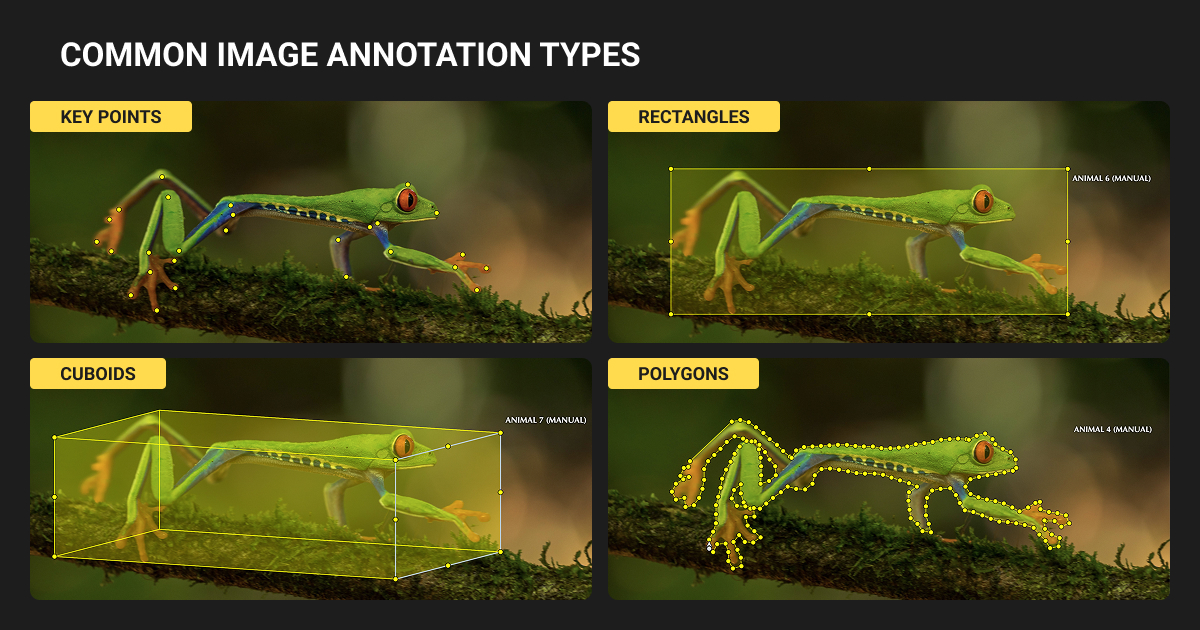
The annotation type you select cascades through your entire pipeline. It determines your:
- model architecture
- annotation cost
- and ultimately what your system can do
Start with the simplest type that meets your requirements.
| Annotation Type | Cost | Best For | Key Limitation |
| Image Classification | $0.03-$0.10 | Scene categorization, content moderation | No localization |
| Bounding Boxes | $0.02-$0.10/object | Object detection, counting, tracking | Poor for thin diagonal objects |
| Semantic Segmentation | $0.10-$3.00 | Autonomous driving, medical imaging | Can't distinguish instances |
| Instance Segmentation | $0.10-$5.00 | Individual object tracking, robotics | 3-10× slower than boxes |
| Keypoint Annotation | $0.10-$0.50 | Pose estimation, facial landmarks | High annotator variance |
| 3D Bounding Boxes | $0.50-$5.00/frame | Autonomous driving, robotics | Requires 3-4 weeks training |
Bounding boxes
Bounding box annotation remains the fastest and cheapest localization method. It works with YOLO, Faster R-CNN, and SSD architectures.
Draw boxes correctly:
- Make boxes tight: edges should touch the outermost pixels of the object
- Establish rules for truncated objects at image boundaries (annotate if >25% visible)
- Use visibility flags for occluded objects to distinguish "not present" from "present but hidden"
Watch for critical failures:
Thin diagonal objects (pens, road markers) occupy far less area than their bounding box. Your model credits background pixels equally.
Overlapping boxes in crowded scenes confuse instance association, degrading recall by 10%+ compared to instance segmentation.
Instance segmentation
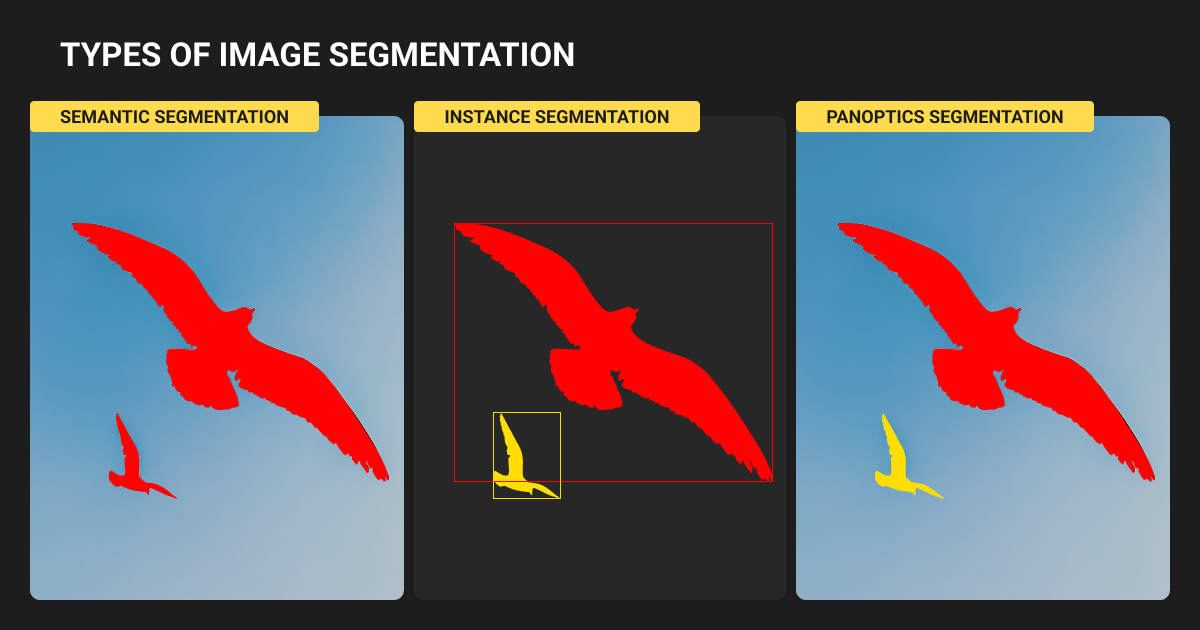
Instance segmentation takes 3-10× longer than boxes. But here’s the efficiency hack: this research shows that pretraining with bounding boxes and fine-tuning with just 5-10% instance masks achieves 100-101% of fully supervised performance.
We suggest labeling bounding boxes first across your dataset. Add masks incrementally where the model needs them most. Then, use error analysis to guide where to invest in pixel-level precision.
Keypoints and 3D annotation
Use keypoint annotation for pose estimation and facial landmarks. COCO defines 17 keypoints per person; COCO-WholeBody extends to 133 including face, hands, and feet.
Each keypoint needs a visibility flag (visible, occluded but inferable, or unlabeled). Roughly 35% of COCO keypoints are unannotated due to occlusion.
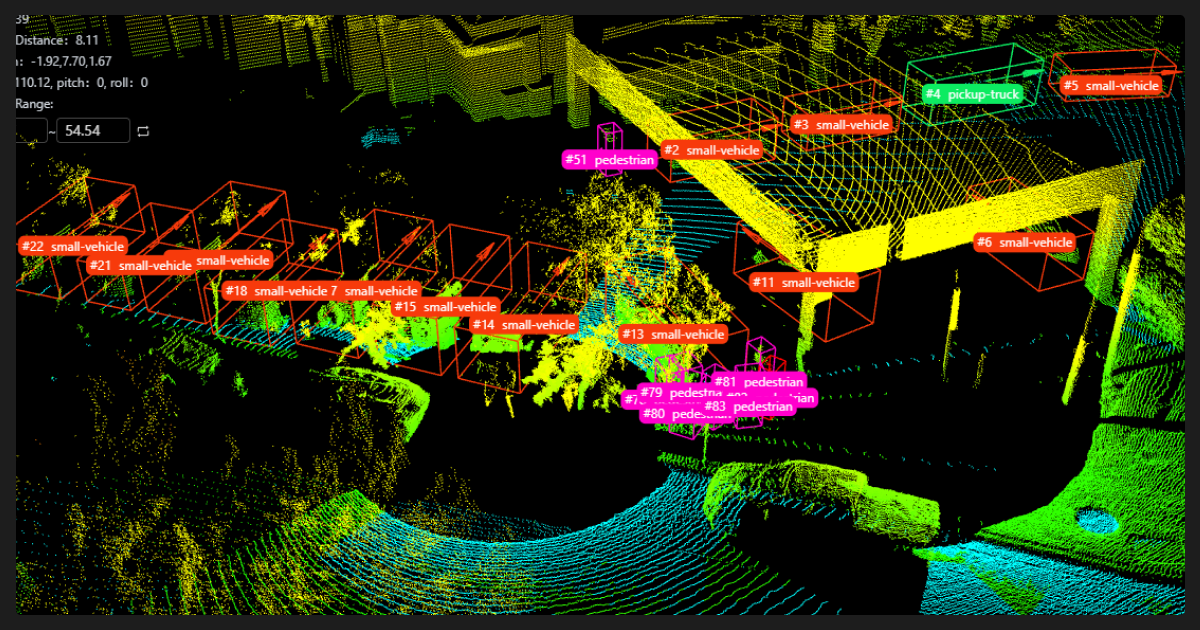
3D annotation with bounding boxes serve autonomous driving and robotics. Over 80% of perception tasks in the Waymo dataset rely on 3D cuboids. This is your most expensive annotation and even experienced annotators need 3-4 weeks of dedicated training to master LiDAR annotation.

Prototype schemas on a tiny data subset first, then test with a quick model to see what breaks. Start small, get your annotation team involved early, and iterate before committing to the full dataset.

 Founder, Fotoria
When Public Datasets Work (and When They Don’t)
Public machine learning datasets accelerate development, but treating them as substitutes for domain-specific data is one of the most common production mistakes.
Major datasets overview
| Dataset | Scale | Best For | Critical Limitation |
| COCO | 330K images, 80 categories | Object detection benchmarks | Western/Flickr bias, limited categories |
| ImageNet | 14M images, 21K categories | Transfer learning foundation | Classification only, no localization |
| LVIS | COCO images, 1,200+ categories | Long-tail detection | Still poor on rare categories |
| Cityscapes | 5K urban scenes | Autonomous driving | European cities only |
| SA-1B | 11M images, 1.1B masks | Segmentation research | Class-agnostic masks |
Use public datasets for
You can rely on public datasets for prototyping and proof-of-concept work, academic benchmarking, and transfer learning foundations.
Always start with pretrained weights (ImageNet backbone, COCO-pretrained detector) and evaluate whether fine-tuning closes your performance gap.
For YOLO-based detection, a few hundred annotated objects per class typically suffices for effective fine-tuning.
You need custom image labeling when
Medical imaging
The FDA has authorized 950+ AI/ML-enabled medical devices as of August 2024. Only 9.4% report training dataset size. Expert data annotation by board-certified radiologists is mandatory. Regulatory requirements demand representative datasets across demographic subgroups.
Autonomous driving
Safety-critical applications demand coverage of rare edge cases, geographic and weather diversity, and alignment with proprietary sensor configurations. Tesla collects data from ~7 million vehicles. Waymo has driven 20+ billion simulation miles. Public datasets cannot match this scale or sensor alignment.
Manufacturing defect detection
Defects are specific to your products, processes, materials, and factory conditions. Camera positions, lighting, conveyor speeds, and product variants are all facility-specific. MVTec AD serves as a research benchmark but its 5,000 images are insufficient for production.
Core signal for your team
If your production data distribution differs meaningfully from any available public dataset, transfer learning alone will not close the gap. This includes unique imaging modalities (infrared, microscopy, X-ray, hyperspectral), novel object classes, and applications requiring regulatory compliance with documented training data.
We asked a few annotators to try real creative tasks with a minimal schema. Their feedback helped us fix the categories. The big win was catching those weird edge cases early, which meant we didn't have to completely redo our annotation schema after the first model runs.
 Founder and CEO Superdirector (Enlighten Animation Labs)
How to Label Images for ML Without Compromising Quality
Label noise damages model performance more than feature noise. Small amounts of noise produce disproportionately large performance degradation.
Measure quality rigorously
Target these thresholds:
- Intersection over Union (IoU) >0.5 for standard detection, >0.75 for strict evaluation
- Inter-annotator agreement (Cohen's Kappa) >0.8 for excellent agreement, <0.6 signals problematic guidelines
- Error rate below 2%
Inter-annotator agreement provides an empirical upper bound on achievable model performance. If two expert annotators disagree 20% of the time, your model ceiling is roughly 80% accuracy.
Common errors and fixes
- Inconsistent labeling across annotators comes from vague guidelines. You must write explicit visual examples for edge cases, including what NOT to label.
- Missing annotations on small or occluded objects come from fatigue, so set attention to minimum object size thresholds and QA sampling.
- Inaccurate boundaries come from time pressure. Establish zoom guidelines and boundary precision metrics in QA.
- Class confusion between visually similar categories comes from insufficient training. Consider adding side-by-side comparison examples in guidelines.
Build multi-tier review
Professional data annotation services deploy initial annotation by trained annotators, QA review by senior reviewers (10-15% sample), and domain expert review for complex cases.
For high-stakes tasks like medical imaging or autonomous driving, vendors with domain expertise like Label Your Data integrate expert annotation with strict annotation QA processes where annotator expertise directly impacts label accuracy.
Foundation Models Are Changing the Image Labeling Game
SAM’s release back in April 2023 changed annotation economics. Before SAM, pixel-level segmentation required manual work at $0.10-$3.00 per mask. Now, a click-to-segment workflow generates high-quality masks in milliseconds.
How to label images automatically: Your tool options
| Tool | Primary Function | When to Use |
| SAM/SAM 2 | Zero-shot segmentation | Refining boxes into masks, interactive annotation |
| Grounding DINO | Open-vocabulary detection | Zero-shot object detection with text prompts |
| Grounded SAM | Detection + segmentation | Most complete zero-shot pipeline (text → boxes → masks) |
| Florence-2 | Multi-task unified model | Need captions + detection + segmentation + OCR |
| YOLO-World | Real-time open-vocab detection | Edge deployment, high-throughput annotation |
Critical limitations
SAM’s performance degrades significantly on medical images, satellite imagery, microscopy, and industrial inspection. SAM 3 “almost completely fails” on medical datasets like DSB 2018 and RAVIR. It also struggles with shadow detection, camouflaged objects, transparent objects, and reflective surfaces.
For medical, satellite, or industrial domains, start with domain-adapted models (MedSAM, fine-tuned variants) and plan for substantial human correction.
Also, note that foundation models typically achieve 70-85% accuracy versus 90%+ for human-labeled data (our team at Label Your Data maintains a 98% accuracy benchmark).
So foundation models are sufficient for prototyping but require human correction for production deployment.
The Annotation Strategy Behind How to Label Images for Machine Learning
Most production machine learning teams converge on hybrid strategies. The teams that reach this conclusion fastest ship better models sooner.
Your 2026 workflow
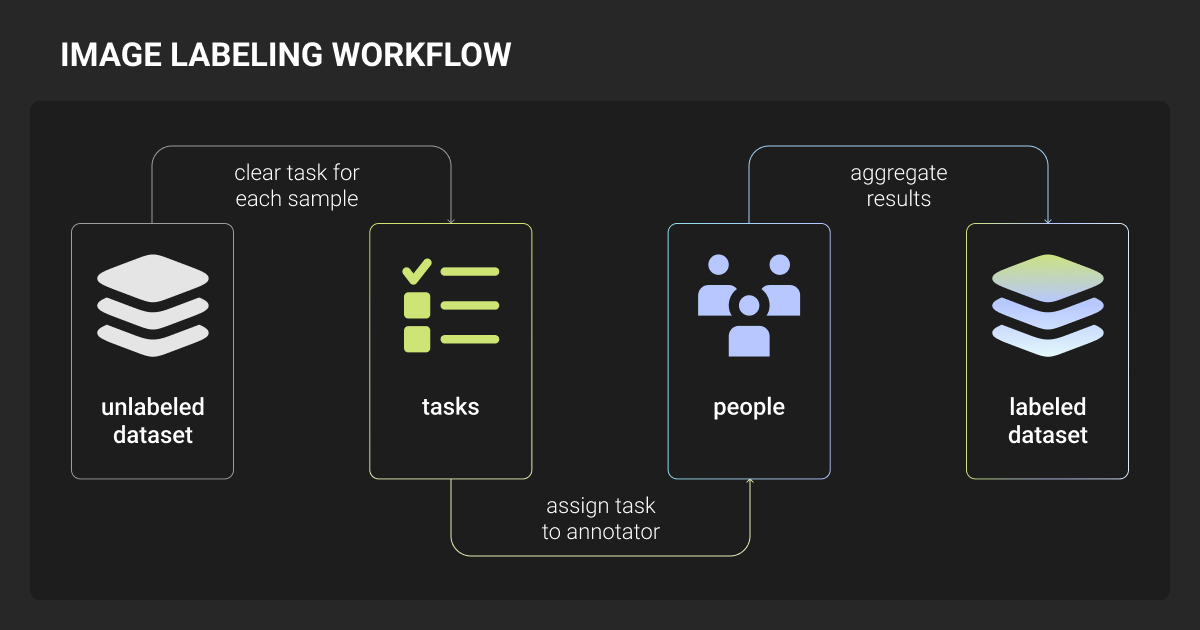
- Upload raw data
- Run foundation model pre-labeling (SAM, Grounding DINO, or Florence-2)
- Set confidence thresholds to route uncertain predictions to human review
- Human annotators correct and validate
- Corrected labels feed back into the model for the next iteration
This human-in-the-loop approach reduces annotation effort by 3-5× compared to purely manual workflows.
Active learning amplifies efficiency
Rather than labeling data uniformly, your model identifies the most informative unlabeled data samples (lowest prediction confidence or highest disagreement) and routes only those to human annotators.
Proven results:
- AWS case studies: >90% cost reduction with turnaround shrinking from weeks to hours
- Research demonstrates: 20-25% of data through active learning can achieve 95% of full-dataset performance
- Lightly AI reports: As few as 3-5 images per class in some scenarios
Four decision factors for how to label images for ML
Domain specificity (strongest signal)
Standard objects well-represented in COCO or ImageNet can leverage public datasets and zero-shot foundation models. Domain-specific tasks almost always require custom, high-quality annotation with domain experts at a data annotation company.
Quality requirements
Safety-critical applications (autonomous driving, medical diagnosis) demand ≥95% annotation accuracy with maximized recall. Fully automated pipelines won’t meet this bar. General CV applications can target 85-95% with hybrid auto-labeling plus human QA.
Budget and timeline
Image classification costs $0.01-$0.05 per tag. Bounding boxes run $0.02-$1.00 per object. Semantic segmentation reaches $0.05-$5.00 per mask. 3D point cloud annotation peaks at $0.50-$5.00 per frame.
For a full breakdown, see our data annotation pricing page.
Automation front-loads engineering time but dramatically reduces per-image marginal cost. The crossover point where automation justifies setup investment is generally above 10,000 images for standard tasks.
Scale trajectory
Use progressive annotation:
- Start with image-level classification labels
- Add bounding box localization for promising classes
- Progress to segmentation only where model performance demands it
- Use model error analysis to guide where additional annotation investment delivers highest return
Up to 40% of training assets are typically redundant. Targeted, error-driven annotation eliminates this waste.
Don't overbuild your first schema. Start with a tiny set of core annotations, run a fast prototype, and pay close attention to feedback from both people and the model. Just refine your labels each cycle, don't start from scratch.
 Director, Simple Is Good Inc
Tips from our Team on How to Label Images
Start every annotation project with a pilot
Annotate a representative subset, measure inter-annotator agreement, and iterate on guidelines before scaling. Many annotation service companies including Label Your Data offer free pilot projects specifically for this calibration phase.
Before annotating images, it's often helpful to remove background distractions from product or object photos to create cleaner datasets and improve annotation consistency.
Write clear annotation guidelines
Your guidelines need explicit definitions of what counts as correct, visual examples for both clear and ambiguous cases, edge-case handling (occluded objects, unclear boundaries, minimum object size thresholds), and established schemas like COCO format for consistency.
Version control everything
Version your annotation data, guidelines, and quality metrics. DVC with Git is the standard approach; CVAT offers built-in version control for rollback. Track who labeled what and maintain data lineage for audit compliance, especially in regulated industries.
Pro tip: Labels also become inconsistent over time as annotators change or real-world conditions shift. Regular calibration sessions and continuous model error analysis catch drift before it compounds.
Still Guessing How to Label Images?
The ML teams developing the best computer vision systems in 2026 treat image labeling as an engineering discipline.
They start with the simplest annotation type that meets their requirements, add complexity only where models demand it, and build feedback loops between model errors and annotation priorities.
Three things to take away:
- Start with bounding boxes and add segmentation masks only where your model actually needs them. This way, you get near-full performance with a fraction of the labeling work.
- Combining foundation model pre-labeling with human review gets you 95% of full-dataset performance at a fraction of the effort.
- Small annotation errors compound fast and no architecture fix can recover what bad labels break, so quality assurance is infrastructure, not overhead.
About Label Your Data
If you choose to delegate image labeling, run a free data pilot with Label Your Data. Our outsourcing strategy has helped many companies scale their ML projects. Here’s why:
 Data Annotation for Complex Environments
Rely on consistent, high-quality output for complex datasets, detailed taxonomies, and edge cases.
 Structured Quality From Pilot to Production
Get quality engineered into every step through onboarding, evolving guidelines, QA, and continuous feedback.
 Flexible and Scalable Operations
Adjust team capacity, project size, and delivery model as you scale, with no setup fees or long-term lock-ins.
 An Integrated Delivery Partner
Align on goals, workflows, and expectations with a team that integrates into your process from day one.
 Projects Led by Annotation Experts
Work with former annotators who understand annotation complexity, quality standards, and high-volume delivery.
FAQ
What is the difference between image labeling and image annotation?
The terms are used interchangeably in practice. Labeling typically refers to assigning a class tag to an image or region, while annotation is broader and includes localization (bounding boxes, masks, keypoints). In ML pipelines, both describe the same process of adding ground-truth information to training data.
How to classify images in machine learning?
- Choose the right model for your dataset size (ResNet or EfficientNet for standard tasks, ViT for larger datasets)
- Collect and organize images into labeled categories
- Start with a pretrained model and fine-tune on your labeled data rather than training from scratch
- Evaluate on a held-out test set and iterate on both your labels and model until performance meets your requirements
How are images labeled for object detection?
Object detection images are labeled with bounding boxes drawn tightly around each target object, paired with a class label. Each box is defined by its coordinates, width, and height.
The annotations are typically stored in COCO JSON or YOLO TXT format and used to train models like YOLO or Faster R-CNN to both locate and classify objects simultaneously.
How to label images automatically?
- Run a foundation model (Grounded SAM or Florence-2) to generate pre-labels across your dataset
- Set a confidence threshold to separate high-quality automatic labels from uncertain ones
- Send uncertain predictions to human reviewers for correction
- Feed corrected labels back into the pipeline to improve pre-label quality over time
Is CNN or ANN better for image classification?
CNNs outperform standard ANNs for image classification because their convolutional layers are specifically designed to detect spatial patterns like edges, textures, and shapes regardless of where they appear in the image.
ANNs treat every pixel independently and lose that spatial context. For most image classification tasks today, CNNs or transformer-based models like ViT for larger datasets are the standard choice.
Written by
CEO of Label Your Data
Karyna is the CEO of Label Your Data, a company specializing in data labeling solutions for machine learning projects. With a strong background in machine learning, she frequently collaborates with editors to share her expertise through articles, whitepapers, and presentations.