


 Back to blog
Computer Vision Datasets: The Bottleneck for CV Teams

 CEO of Label Your Data


Table of Contents

- TL;DR
- What Makes Computer Vision Datasets Production-Ready?
- Public vs. Custom Computer Vision Datasets
- Common Types of Computer Vision Training Data
- How to Prepare Computer Vision Datasets for Model Training
- Top Computer Vision Training Data Use Cases
- Where to Get Production-Ready Computer Vision Datasets
- About Label Your Data
- FAQ
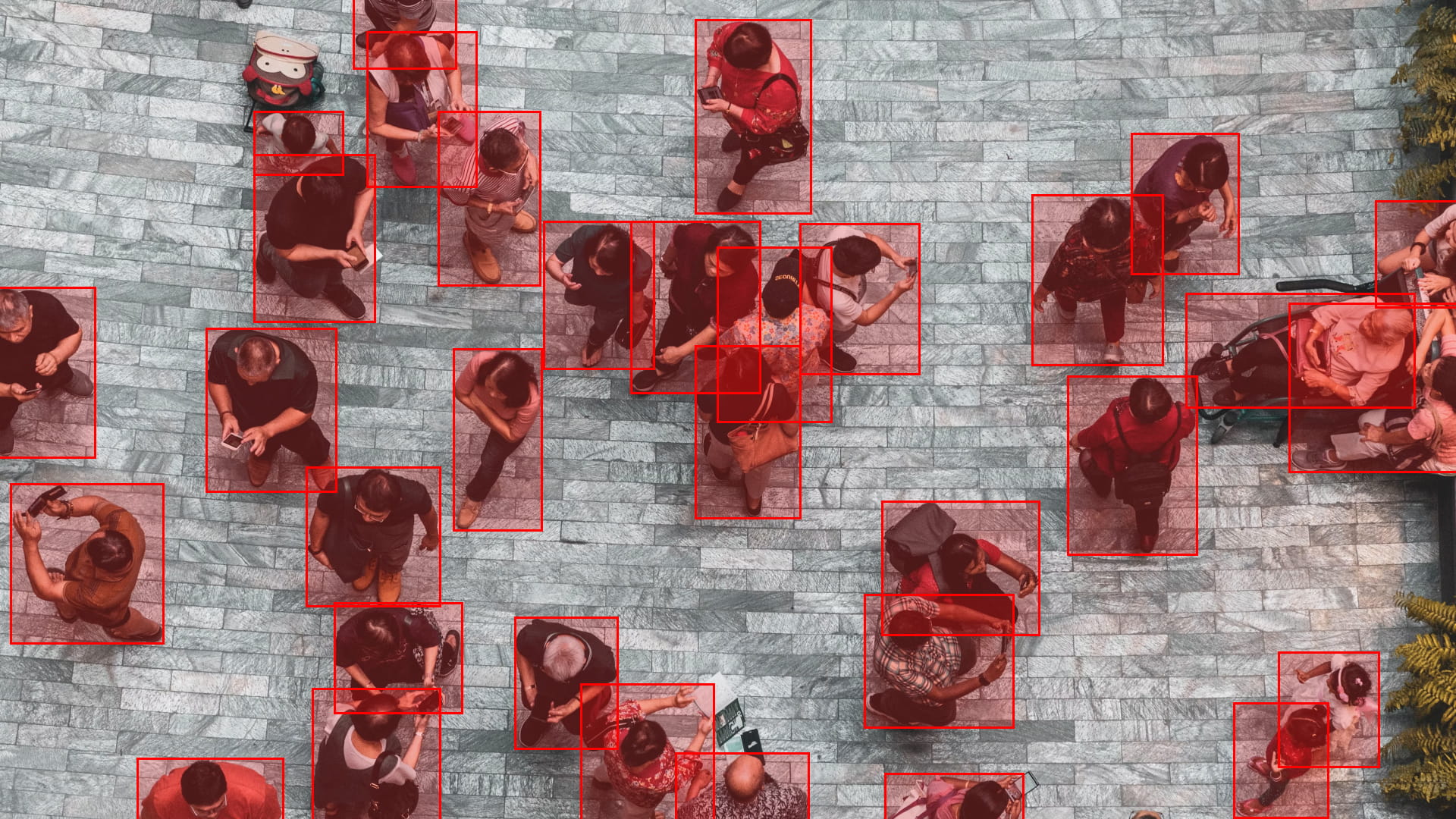
TL;DR
- Computer vision datasets need raw visual data, accurate labels, robust metadata, a strict class taxonomy, dataset splits, and a defined export format to actually be usable for training.
- Building a CV dataset requires four core steps: defining requirements, sourcing data, labeling, and rigorous human-led QA.
- Dataset coverage and QA, not the manual labeling itself, are what usually break in-house computer vision training data efforts.
- Outsourcing makes sense once annotation volume and edge-case complexity outgrow what an in-house ML team can efficiently manage.
Computer vision (CV) projects often hit a wall where iterating on the model architecture stops yielding better results. The models are only as good as the computer vision datasets you train them on.
Whether you are predicting bounding boxes or running pixel-perfect semantic segmentation, the real problem is usually poor training data quality, not the architecture alone.
In this article, we break down what makes a computer vision dataset production-ready: from sourcing, labeling, and QA decisions to real-world use cases and finding an annotation partner who can execute at scale.
What Makes Computer Vision Datasets Production-Ready?
Even the most advanced model architecture has nothing to learn from without a highly structured package of annotated visuals.
A production-ready computer vision dataset must include:
- Raw visual data: The foundational inputs, whether that means RGB images, video frames, LiDAR point clouds, or other sensor outputs.
- Precise annotations: The ground truth mapped to your specific task, such as 2D bounding boxes, instance segmentation masks, or keypoints, that explicitly tells the model what to interpret.
- Comprehensive metadata: The contextual anchors (sensor type, camera angle, lighting, timestamps) that go beyond the pixels and allow you to debug edge cases.
- Rigorous dataset splits: Strict train/validation/test distributions to ensure you can accurately measure performance on unseen data.
- A strict class taxonomy: A fixed, unambiguous set of target categories the model must learn.
- Annotation guidelines: The operational rules that guarantee data annotation consistency across annotators, frames, and complex edge cases.
- A pipeline-compatible export format: Serialized data (COCO, YOLO, Pascal VOC, CVAT XML, or a custom JSON schema) structured specifically for your data loaders.
Skipping these components means having unstructured data that will either break your CV training pipeline or cause silent model failures.
Public vs. Custom Computer Vision Datasets
Once your CV dataset requirements are set, the next architectural decision is sourcing.
There are plenty of free datasets available. The best places to find open computer vision datasets include COCO, ImageNet, Open Images, and Kaggle datasets repositories. They are well-documented and provide a solid baseline.
| Feature | Public datasets | Custom datasets |
| Cost | Free | Requires investment in sourcing and labeling |
| Coverage | General objects, everyday scenes | Your exact environment, sensors, edge cases |
| Labels | Fixed taxonomy, not yours | Built against your own taxonomy |
| Best for | Research, pretraining, benchmarking | Production models deployed in specific conditions |
| Limitation | Won’t reflect your real-world conditions | Takes more time and effort upfront |
The limits of public computer vision datasets
Public machine learning datasets for computer vision optimize for breadth, not your specific project goal. Datasets like COCO span 80 object categories across roughly 330,000 images, which is perfect for pretraining a backbone or benchmarking architectures.
However, if your target objects don’t map cleanly onto a public dataset’s fixed taxonomy, you are forced to rely heavily on transfer learning. Ultimately, the head of your network is still starting from someone else’s assumptions about what matters in a scene.
The advantages of custom datasets in production
A custom computer vision dataset gives you full control over the variables that actually break models in real-world deployment: sensor type, image resolution, lighting, occlusion, and class imbalance.
Most importantly, you dictate the label taxonomy. You don’t have to adapt your project to someone else’s categories, which is critical when classes are visually similar (like ripe vs. unripe fruit) or require specialized domain knowledge.
The only tradeoff is the upfront data annotation pricing and time required to collect, annotate, and review the data.
Common Types of Computer Vision Training Data
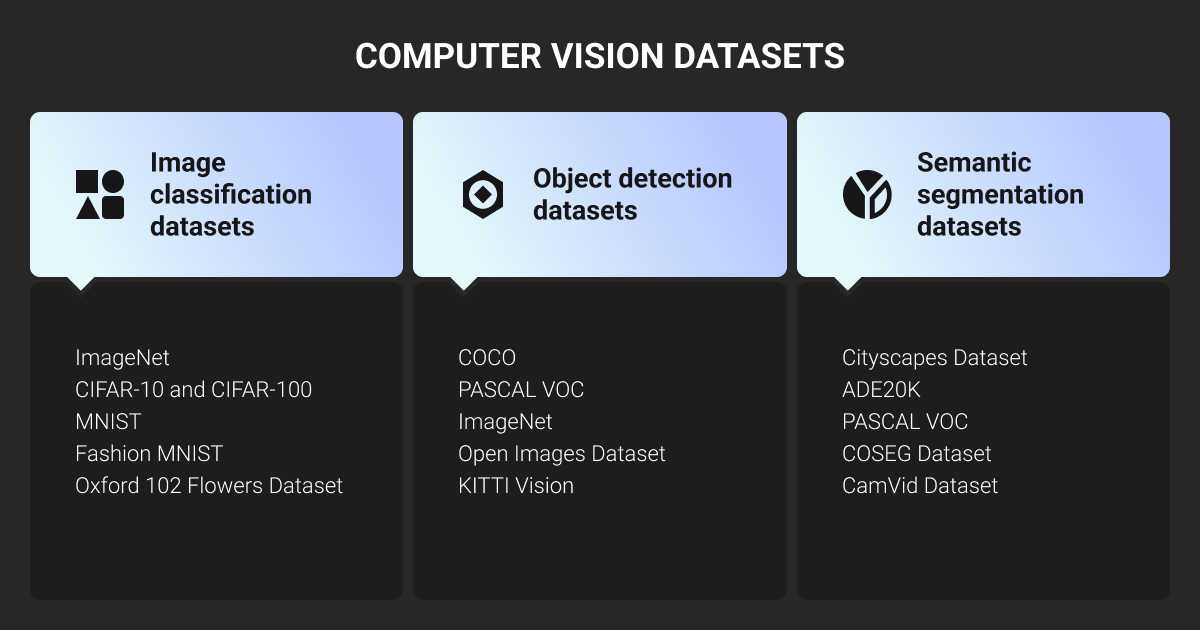
The annotation format you choose directly dictates your model’s architecture. Here’s how AI training data breaks down by computer vision task.
Image classification datasets
Image classification assigns one or more class labels to an entire image, with zero localization. It’s used for tasks like defect presence, product tagging, or document sorting. If the pipeline only needs to answer “what is in this frame?,” classification (as the basic type of image recognition) is the right starting point.
Object detection datasets
Object detection CV datasets provide localization, typically using 2D bounding boxes combined with class labels to mark exactly where an object is.
This format powers computer vision in retail (e.g., retail shelf analytics), traffic monitoring, and computer vision in agriculture (e.g., agricultural robotics). Anywhere spatial coordinates matter as much as the class label, you need detection data.
Image segmentation datasets
Segmentation drops rough bounding boxes in favor of pixel-level accuracy. There are three main types:
- Semantic segmentation: Groups pixels by class.
- Instance segmentation: Separates individual objects within that class.
- Panoptic segmentation: A unified combination of both.
Because data annotators must trace boundaries pixel by pixel, these CV datasets take significantly longer to produce. However, a specialist data annotation company helps you avoid a few pixels of error for high-precision industries like agriculture or geospatial.
Video datasets
Video annotation captures the temporal dimension, tracking movement or flagging specific events across a sequence. Used for action recognition, object tracking, and surveillance, the primary engineering bottleneck here is volume.
A few minutes of footage generates thousands of sequential frames that require consistent and high-quality video annotation services.
3D and multimodal datasets
Many advanced pipelines require more than RGB images, utilizing LiDAR, depth maps (RGB-D), thermal imaging, and sensor fusion. Autonomous vehicles, for example, fuse LiDAR and camera AI computer vision datasets to accurately judge distance.
Annotating multimodal datasets requires strict spatial synchronization across different sensor outputs, requiring a completely different operational skill set than standard image labeling.
Synthetic CV datasets
Synthetic data helps fill in rare edge cases or hazardous scenarios that are difficult to capture in the real world. However, without real-world validation data, the model simply learns the simulation, and the domain gap will cause it to fail in production.
For a deeper dive, check out our guide on synthetic vs. real data.
How to Prepare Computer Vision Datasets for Model Training
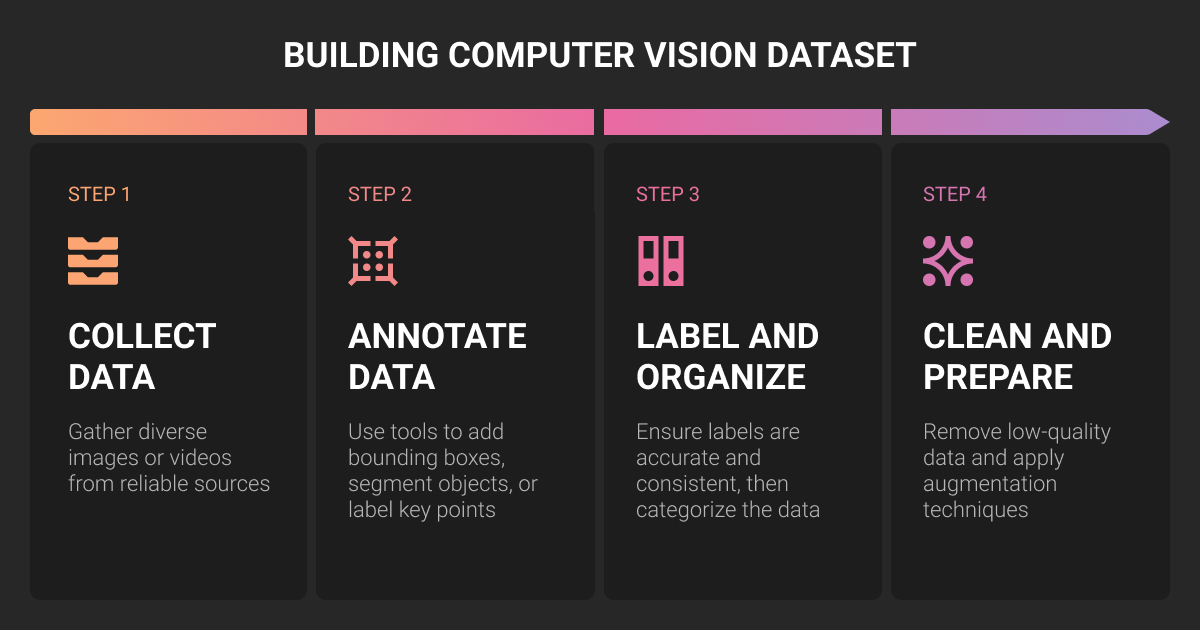
Building image datasets for computer vision in-house requires a strict data pipeline. Even if your team knows the model architecture and data requirements, you still need to follow these four steps:
- Defining CV dataset requirements
- Collecting or sourcing visual data
- Annotating computer vision data
- Running QA before training your CV model
In practice, the mistakes that tank a CV model’s accuracy almost always trace back to one of these phases getting rushed or skipped.
Step 1. Define the CV dataset requirements
Before using any of the data annotation tools, you must lock in these parameters:
- Computer vision task: Classification, detection, segmentation, or tracking.
- Target classes: Clear definitions of what should and shouldn’t be labeled.
- Class granularity: Deciding if "vehicle" is sufficient or if it must be split into "sedan," "truck," and "cyclist".
- Annotation type: Boxes, polygons, masks, keypoints, cuboids, or tracks.
- Edge cases: Rules for occlusion, poor lighting, or overlapping objects.
- Output format: COCO, YOLO, CVAT XML, or custom JSON schemas.
These parameters ensure your images are labeled correctly. This is why CV teams often run a pilot workflow with a specialist computer vision training data partner before scaling annotation work.
Step 2. Collect or source computer vision training data
CV datasets can be sourced internally (using cameras, sites, or installed LiDAR/radar sensors), provided by clients, pulled from public/licensed datasets, or synthetically generated.
Regardless of the source, check commercial-use rights and privacy rules before training starts. Most importantly, the data distribution must match your real deployment conditions regarding lighting, camera angles, and edge cases.
Step 3. Annotate computer vision data
To translate raw footage into computer vision training data, choose the annotation type based on the task, the model, and the level of detail it needs.
| Annotation type | What it means | Best for |
| Classification | One or more tags assigned to an image | Image sorting, defect/no-defect checks, category detection |
| Bounding boxes | Rectangles drawn around objects | Object detection when exact shape isn’t critical |
| Polygons | Lines drawn around object shapes | Irregular objects where boxes capture too much background |
| Segmentation masks | Pixel-level object labeling | Semantic or instance segmentation |
| Keypoints | Specific points marked on an object | Pose estimation, body joints, package corners, landmarks |
| 3D cuboids | 3D boxes around objects | LiDAR annotation, 3D object detection, autonomous driving |
| Polylines | Lines drawn along narrow objects | Lane markings, cables, roads, crop rows |
| Object tracking | The same object followed across frames | Video annotation, tracking, movement analysis |
After choosing the annotation type that fits your model goals, you must establish clear guidelines for edge cases and a rigid structure for your class taxonomy and label attributes.
Small inconsistencies can easily break CV data loaders or training pipelines. A professional workflow requires label organization, human-led QA, continuous feedback, and version control.
Without it, your AI computer vision datasets will be impossible to debug or reuse.
Step 4. Run CV dataset QA before training
Before feeding computer vision training data to your model, run a rigorous human-led quality assurance (QA) pass.
First, check raw files for duplicates, corrupted images, unreadable frames, missing files, and severe class imbalances. Next, audit the annotations, dataset splits, and export formatting. Ensure no near-identical samples leak from the training set into the validation set.

For evaluation, use a mix of precision, recall, and IoU with a sharp eye on practical applicability rather than vanity numbers. In my work, choosing efficient architectures has been key to balancing accuracy and scalability, which is a nice way of saying smarter models, fewer midnight debugging sessions.

 Co-Founder & CEO, eyefactive
Annotation QA is usually where in-house timelines slip because it has to scale linearly with the CV dataset. This is where Label Your Data comes in to help you build a dedicated QA layer around the data annotation services process long before the CV data reaches your training pipeline.
Top Computer Vision Training Data Use Cases
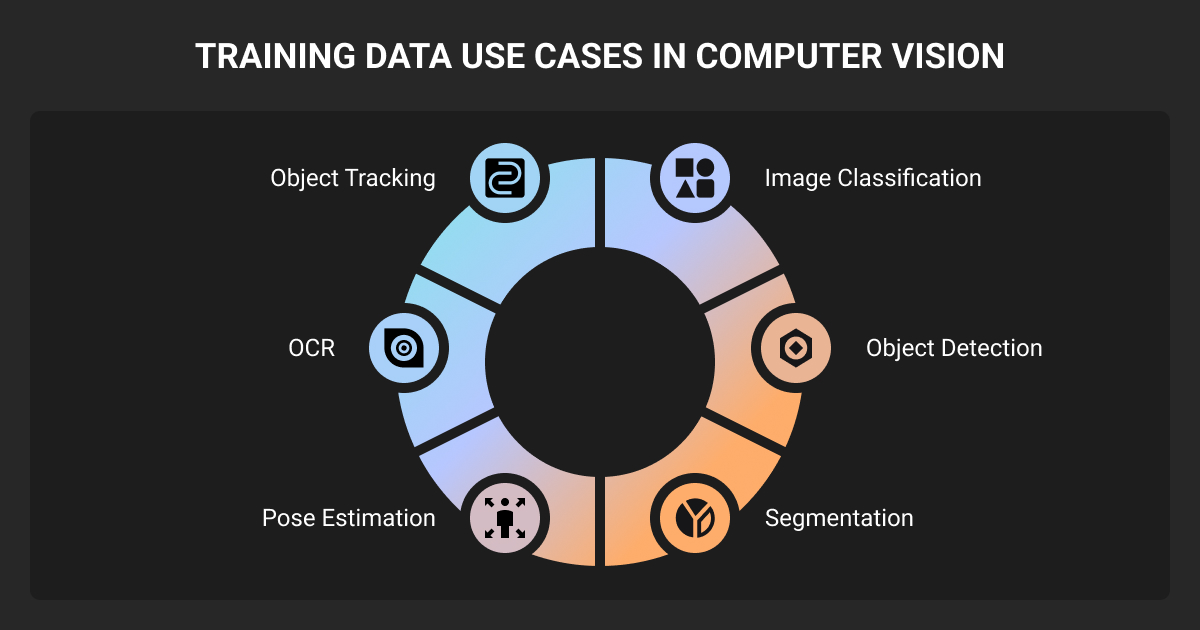
Different industries require completely distinct CV dataset configurations, even when the underlying computer vision tasks look identical on paper.
Autonomous vehicles and ADAS
Autonomous vehicle systems rely on object detection, lane detection, and semantic segmentation to interpret environments in real time.
Sensor fusion and LiDAR annotation provide the depth and distance data that a single camera cannot capture. Object tracking maintains consistency across frames, which is critical for edge cases like sudden occlusion or poor weather.
For example, Ouster partnered with Label Your Data to get professionally annotated LiDAR point clouds for advanced digital lidar sensors using 2D bounding boxes and 3D cuboids across diverse environments. The computer vision datasets annotated by our team directly improved their model detection performance by 20%.
Manufacturing and production QC
Computer vision in manufacturing, including surface inspection and defect detection, helps identify flaws on high-speed production lines.
Assembly verification ensures components are seated correctly before advancing to the next stage. Because production lines operate on strict quality tolerances, image datasets for computer vision in manufacturing typically require pixel-level defect labels with zero room for error.
Precision agriculture
Agricultural computer vision relies heavily on drone imagery for crop monitoring, disease detection, and yield estimation. Livestock detection tracks animal health and location across large areas.
In a recent collaboration, KAUST partnered with Label Your Data to annotate high-resolution aerial imagery using precise polygon masks. Our annotators enabled the KAUST’s models to accurately detect individual palm trees at a 98% accuracy rate for research and monitoring.
Sports technology and human movement
Action recognition and pose estimation power player analytics and fitness applications. Tracking machine learning algorithms follow individual athletes, and movement segmentation breaks complex motion down into distinct phases for coaching or injury prevention.
To support this type of pipeline, Label Your Data collected and annotated nearly 15,000 images with skeleton labels for a US-based motion entertainment company Nex. Our team also validated pre-annotations to improve body tracking consistency for Nex’s motion-based games, achieving 12% higher model accuracy.
Geospatial and satellite imagery
Aerial and satellite imagery support land use classification, road extraction, and building detection at a massive scale. Infrastructure mapping and disaster monitoring (e.g., deforestation detection) also rely on these techniques to assess changing environments rapidly.
For the AirSeed project, Label Your Data segmented large GIS files from drone imagery to identify viable planting zones. The resulting datasets integrated directly into the geospatial ML pipeline of an Australian reforestation company.
Where to Get Production-Ready Computer Vision Datasets
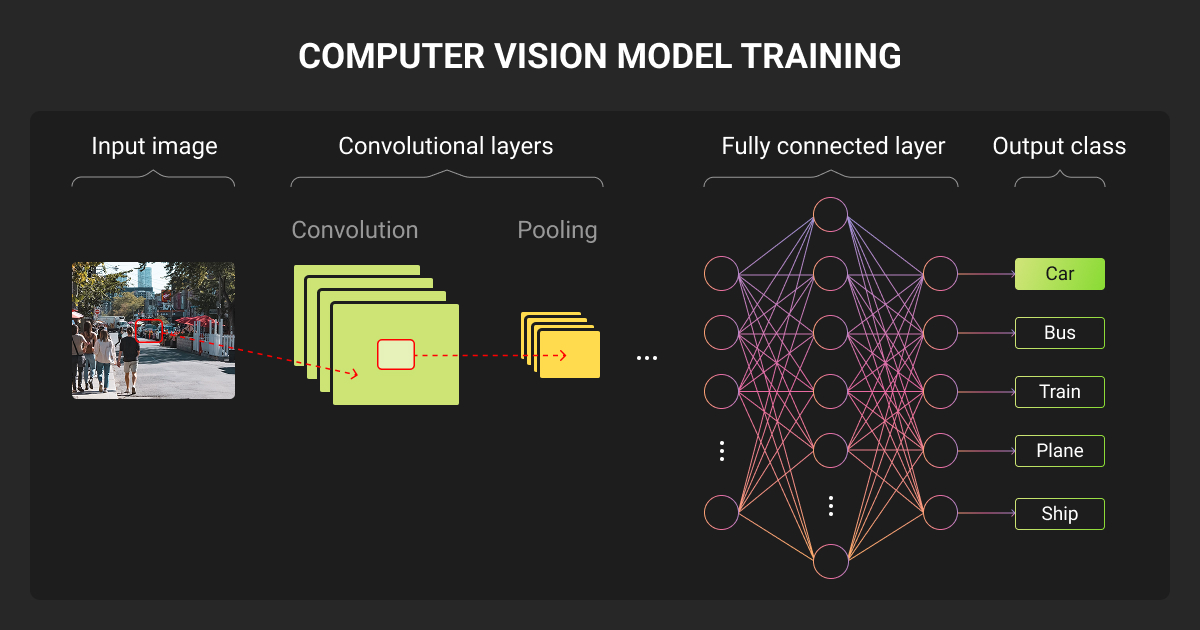
Public computer vision datasets will get your model through a proof of concept, but real-world deployment requires custom data tailored to your specific sensors, edge cases, and taxonomy.
When building training data in-house, CV teams typically hit a wall during the annotation and QA phases that drains expensive engineering hours.
To get production-ready CV datasets without derailing your pipeline, you have to scale the annotation program efficiently. This usually means partnering with a specialized data annotation company like Label Your Data for:
- Scalable, human-first workflows: Processing massive frame volumes without extending training timelines.
- Dedicated QA pipelines: Catching mislabeled attributes and spatial errors before the data reaches your model.
- Complex data formatting: Managing advanced requirements like multi-sensor LiDAR cuboids or pixel-perfect instance segmentation.
Ultimately, treating your computer vision dataset with the same engineering rigor as your model architecture is the only way to ensure reliable performance in production.
About Label Your Data
If you choose to delegate data annotation for computer vision models, run a free data pilot with Label Your Data. Our outsourcing strategy has helped many companies scale their ML projects. Here’s why:
 Data Annotation for Complex Environments
Rely on consistent, high-quality output for complex datasets, detailed taxonomies, and edge cases.
 Structured Quality From Pilot to Production
Get quality engineered into every step through onboarding, evolving guidelines, QA, and continuous feedback.
 Flexible and Scalable Operations
Adjust team capacity, project size, and delivery model as you scale, with no setup fees or long-term lock-ins.
 An Integrated Delivery Partner
Align on goals, workflows, and expectations with a team that integrates into your process from day one.
 Projects Led by Annotation Experts
Work with former annotators who understand annotation complexity, quality standards, and high-volume delivery.
FAQ
What is a computer vision dataset?
A computer vision dataset is a collection of images, videos, or sensor data used to train and test CV models. It usually includes labels, such as classes, boxes, masks, keypoints, or object tracks.
What is COCO dataset in computer vision?
COCO is a large public computer vision dataset used for object detection, segmentation, and image captioning. Teams use it for benchmarking and training CV models.
Is OpenCV still relevant?
Yes, OpenCV is still relevant for image processing, video processing, object detection, camera calibration, and CV pipeline development. The release of OpenCV 5.0 was in 2026, which shows the library is still actively maintained.
What type of data is mainly used in computer vision?
Computer vision mainly uses visual data, such as images and videos. Depending on the project, it can also use LiDAR cloud points, 3D depth maps, thermal images, satellite images, medical scans, or multimodal sensor data.
What are the best places to find open computer vision datasets?
If you need open-source computer vision datasets for pre-training or a proof of concept, repositories like Roboflow Universe and Hugging Face offer massive, pipeline-ready collections with easy API access.
For state-of-the-art research benchmarks, PapersWithCode is the industry standard, while Kaggle and Google Dataset Search remain excellent aggregators for finding niche, community-uploaded CV data. But expect to write custom conversion scripts to standardize their varying export formats.
Written by
CEO of Label Your Data
Karyna is the CEO of Label Your Data, a company specializing in data labeling solutions for machine learning projects. With a strong background in machine learning, she frequently collaborates with editors to share her expertise through articles, whitepapers, and presentations.